



Videogenic: Identifying Highlight Moments in Videos with Professional Photographs as a Prior
Videogenic finds highlight moments in videos by learning from professional photographs.
Summary
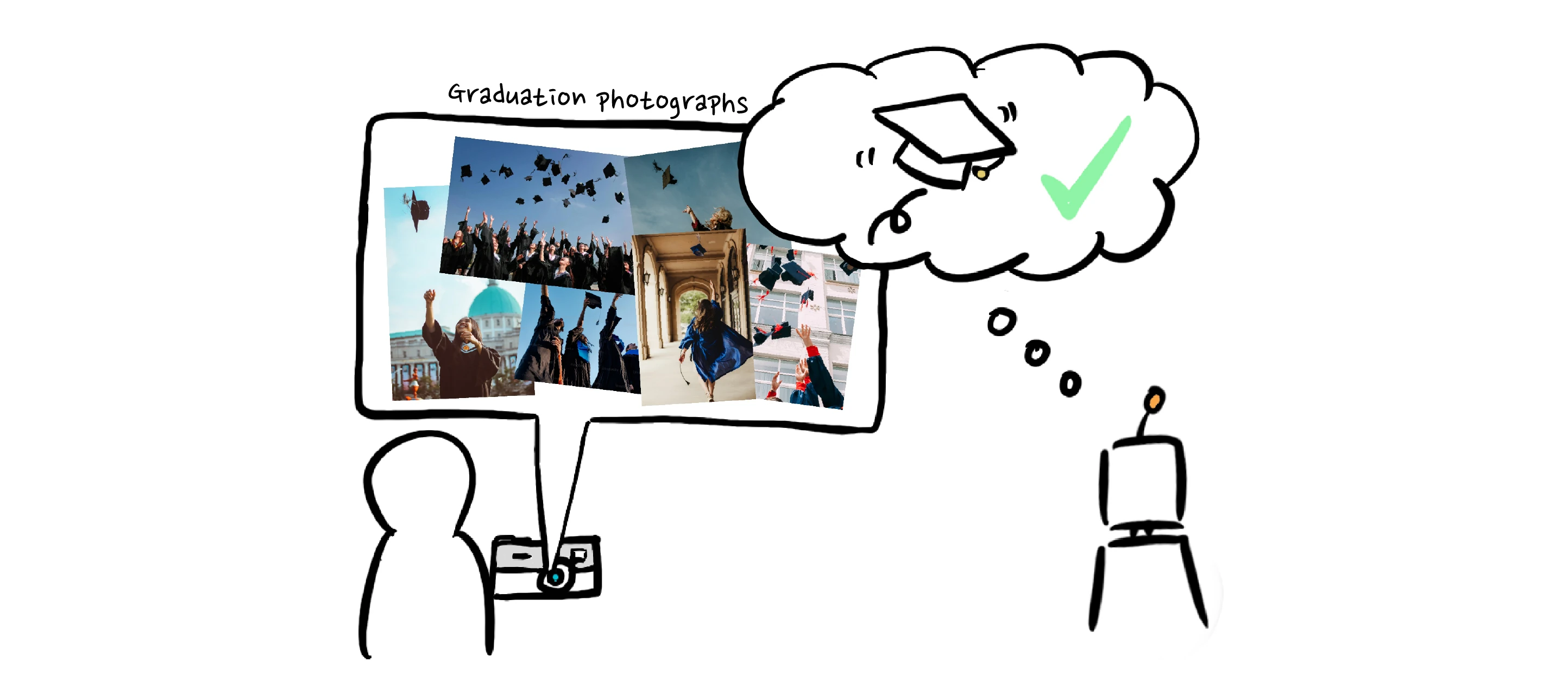
This paper investigates the challenge of extracting highlight moments from videos. To perform this task, we need to understand what constitutes a highlight for arbitrary video domains while at the same time being able to scale across different domains. Our key insight is that photographs taken by photographers tend to capture the most remarkable or photogenic moments of an activity. Drawing on this insight, we present Videogenic, a technique capable of creating domain-specific highlight videos for a diverse range of domains. In a human evaluation study (N=50), we show that a high-quality photograph collection combined with CLIP-based retrieval (which uses a neural network with semantic knowledge of images) can serve as an excellent prior for finding video highlights. In a within-subjects expert study (N=12), we demonstrate the usefulness of Videogenic in helping video editors create highlight videos with lighter workload, shorter task completion time, and better usability.
Video
Background
A highlight video is a short clip of the best moments from a longer video, such as a great skateboard trick or the main ceremony of a wedding, to share on social media or on platforms like TikTok and YouTube Shorts. However, what counts as a highlight depends on the domain. Prior systems either use features designed for one domain (e.g., detecting when a goal is scored in sports videos), so they only work for that domain, or train neural networks on large amounts of video data, which is costly.
Our key insight is that photographers tend to capture the most remarkable, or photogenic, moments of an activity. In this work, we use a small collection of professional photographs as a prior for finding highlights in videos from many different domains, without any further training.
Method
We present Videogenic, a technique for identifying highlight moments in videos using a small collection of professional photographs of the activity. We built a proof-of-concept system with three steps: classifying the activity, computing highlight scores, and generating the highlight video.
Design Principles
Based on prior work, we designed Videogenic with three principles:
- Domain-agnostic highlights. Work across many domains, such as sports, events, and nature videos.
- Domain-specific knowledge. Understand what a highlight is for each domain. For example, the trick in a skateboarding video, or the officiant addressing the couple in a wedding video.
- Flexible user control. Offer both an automatic and an interactive mode at different steps.
Classifying the Activity
The user can type a keyword for the primary activity of the video (e.g., skydiving), or let Videogenic find it automatically by comparing the video frames with a database of activity labels using CLIP.
Computing Highlight Scores
Given the activity, Videogenic retrieves 10 professional photographs of it (e.g., the top 10 results from Adobe Stock) and averages their CLIP image encodings into one representation, which we call the average photograph. We found that a single photograph sometimes brought in details unrelated to the highlight, such as a particular time of day or background, and averaging the 10 photographs removed these effects. Each video frame's highlight score is its cosine similarity with the average photograph, normalized to a range of 0 to 1 across the video. For a different domain, Videogenic uses a different set of photographs, such as wedding photographs.
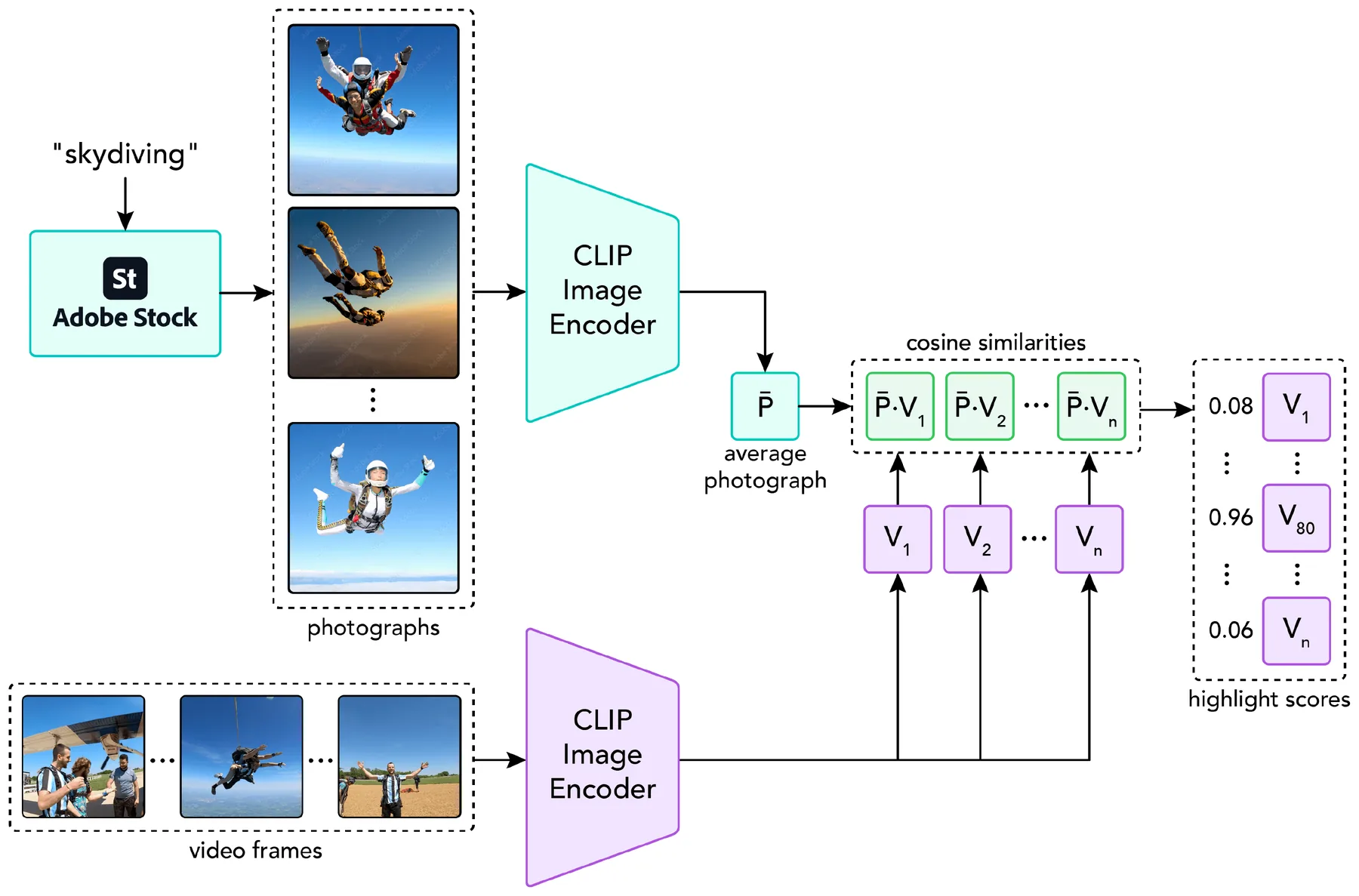
skydiving with each video frame to predict the frame's highlight score.Highlight Graph
The highlight graph plots the score of every frame in order, so the user can spot potential highlights at a glance.
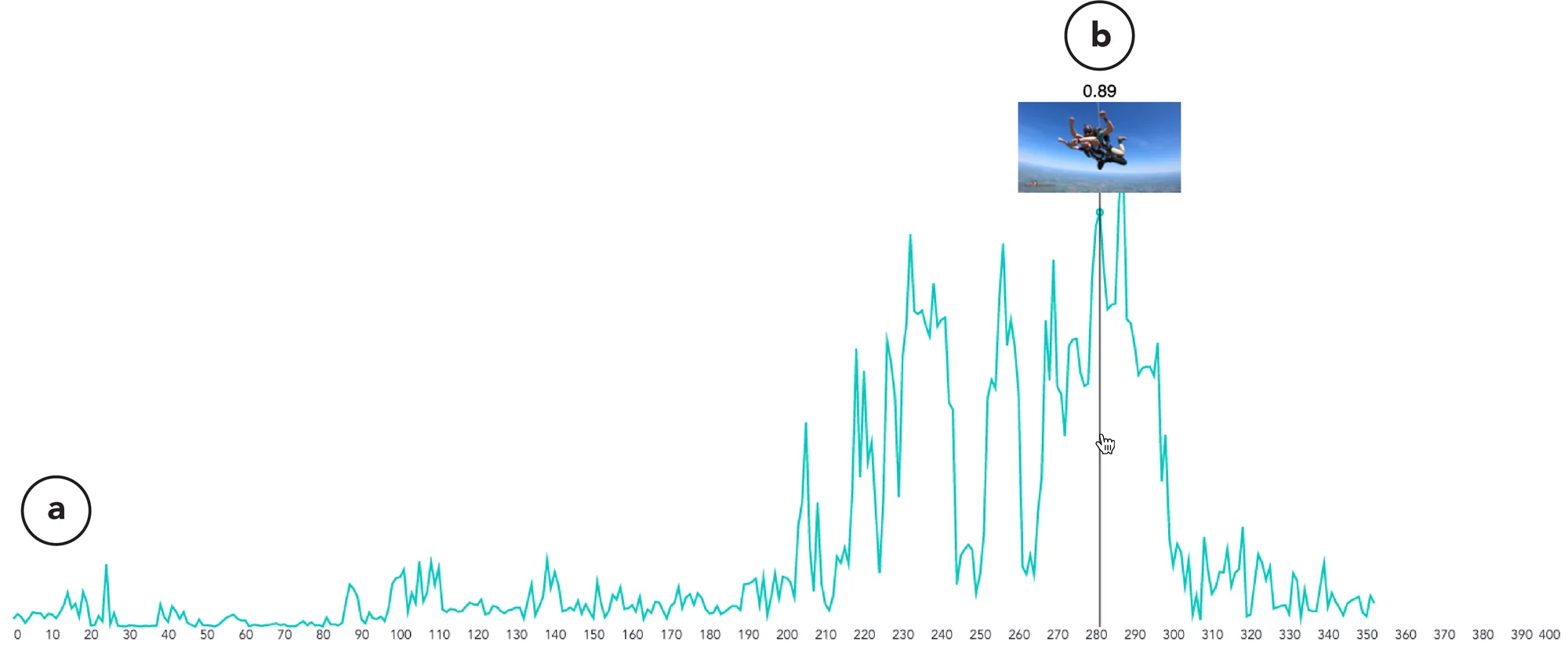
For example, in a long skydiving video, freefall gets the highest scores, jumping out of the plane and landing get moderate scores, and boarding the plane gets low scores. Changing the keyword to skydiving landing retrieves a new set of photographs, so the user can explore different kinds of highlights in the same video.
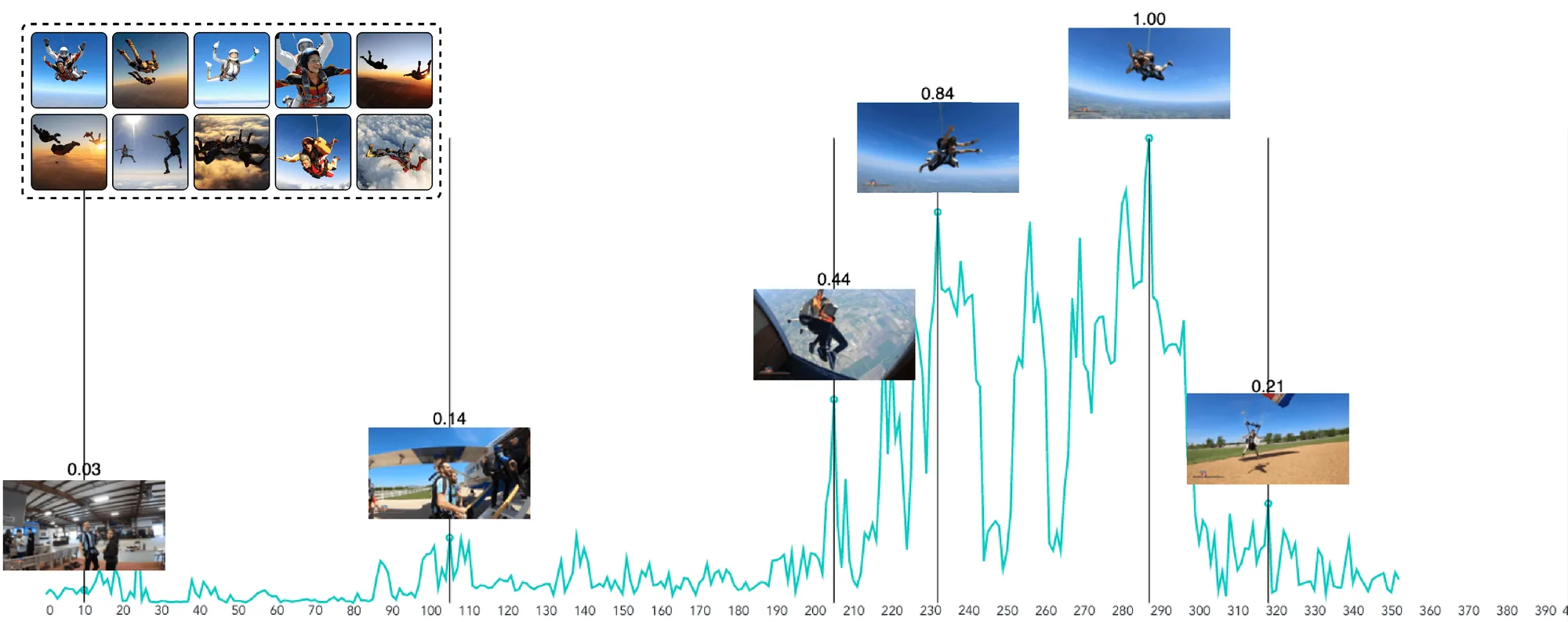
skydiving, with the photograph collection in the top-left corner.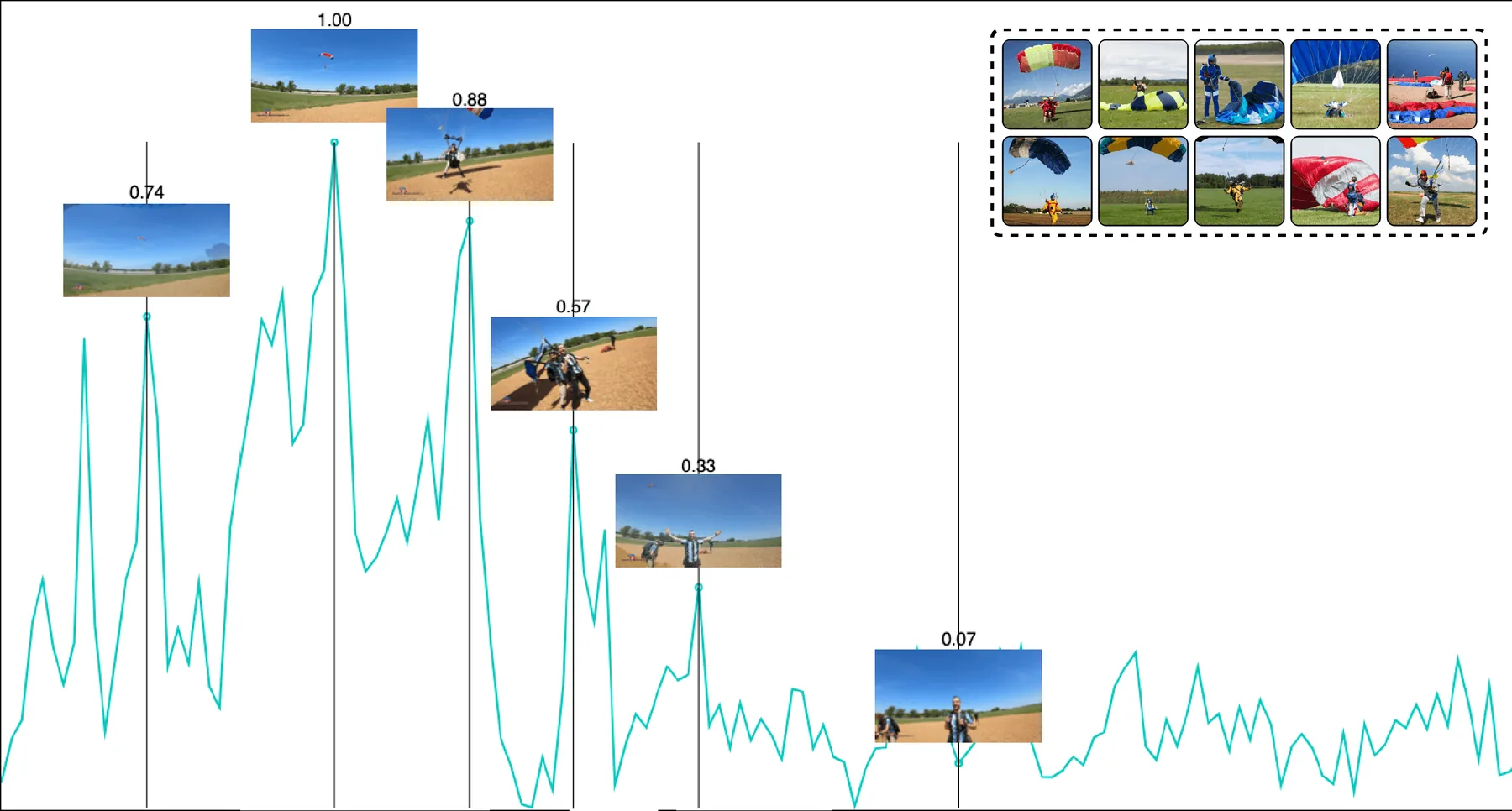
skydiving landing and its photograph collection (top right).Generating the Highlight Video
The user can brush over the highlight graph to select an interval as the highlight video. In the automatic mode, Videogenic slides a window of a fixed length (e.g., 10 seconds) across the scores and picks the interval with the highest sum.
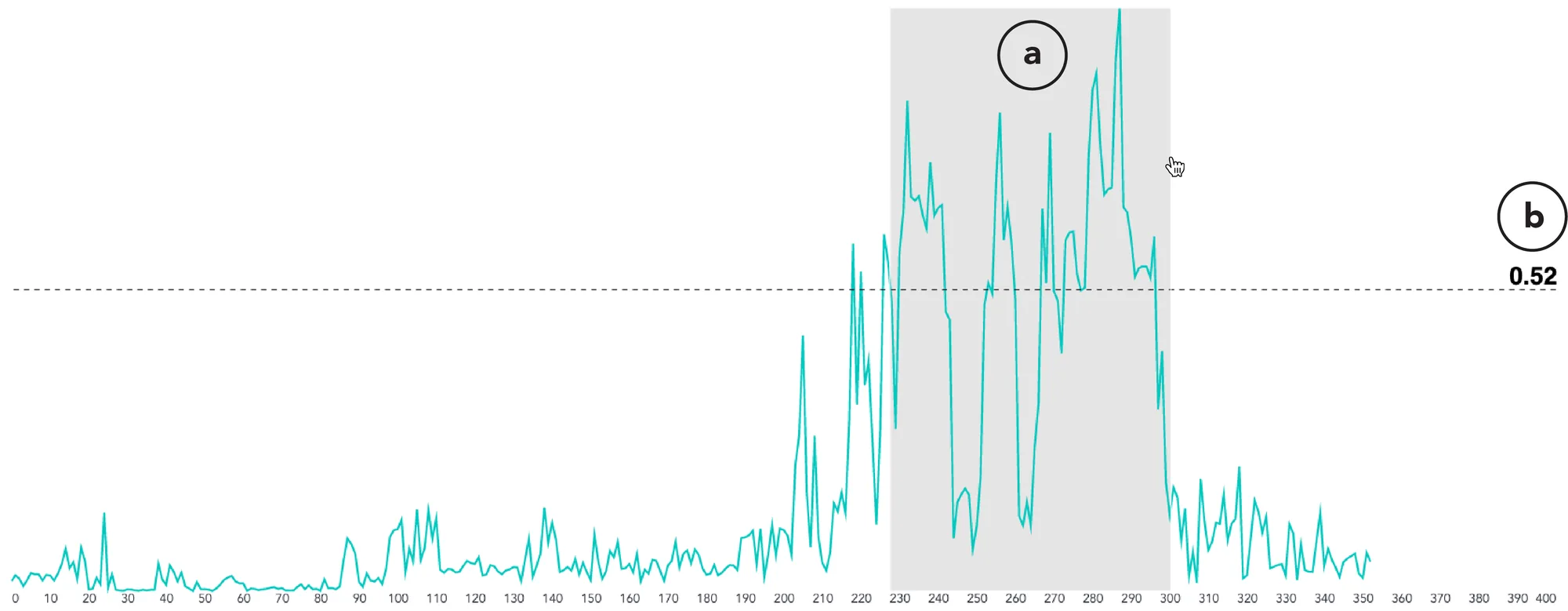
Human Evaluation
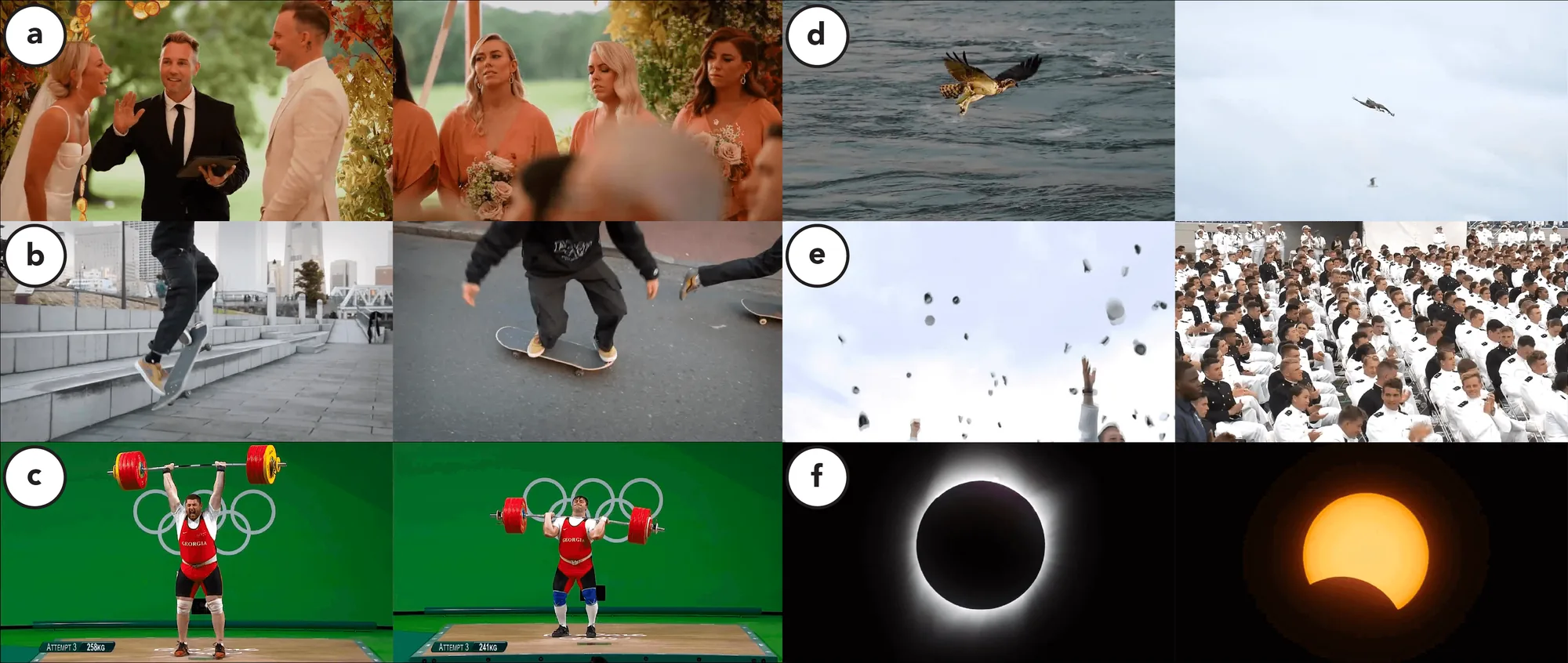
We compared Videogenic with a baseline that uses CLIP to compare the activity keyword directly with each video frame, instead of using the average photograph. We chose this baseline for two reasons: like Videogenic, it needs no training, and comparing the two shows how useful professional photographs are as a prior. We collected 16 source videos from YouTube, from 30 seconds to 4 hours long, covering sports, events, nature, and animals, and asked 50 participants on Prolific to pick the highlight they preferred for each video.
Participants preferred Videogenic's highlights for 14 of the 16 videos, and chose Videogenic 80% of the time on average, which was significant. The two exceptions were surfing and skydiving. We hypothesize that the main reason is that Videogenic does not use motion information, since its prior is photographs, and its highlights for these two videos were more static shots.
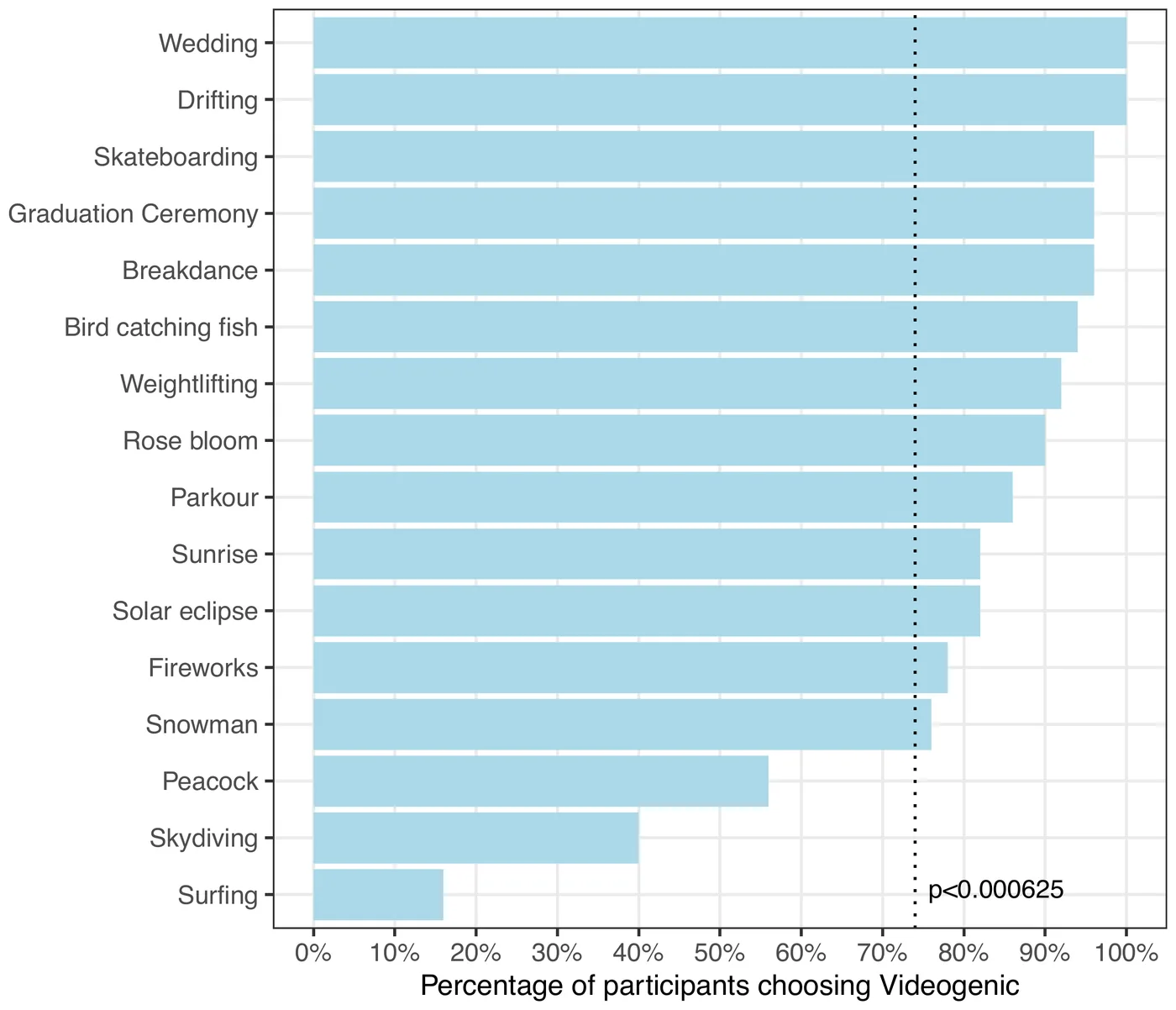
The baseline was generally able to find relevant content, but Videogenic was better at finding the most remarkable moment (e.g., the kickflip or the graduation hat toss) and also picked up composition and framing from the photographs (e.g., a low-angle shot of the skateboarder).
Expert Study
We conducted a within-subjects study with 12 professional video editors from Upwork, all of whom regularly use Adobe Premiere Pro. Each editor created one highlight video with Videogenic and another by manually editing in Premiere Pro, from full-day vlogs of skydiving and surfing, in counterbalanced order. After each condition, editors rated their workload (NASA TLX) and usability (SUS) on 7-point Likert scales and reported how long the task took.
Editors reported a significantly lower workload and a significantly shorter task completion time with Videogenic. They rated its usability higher than Premiere Pro, but not significantly. This is not surprising, as Premiere Pro is polished software that the editors already know well.
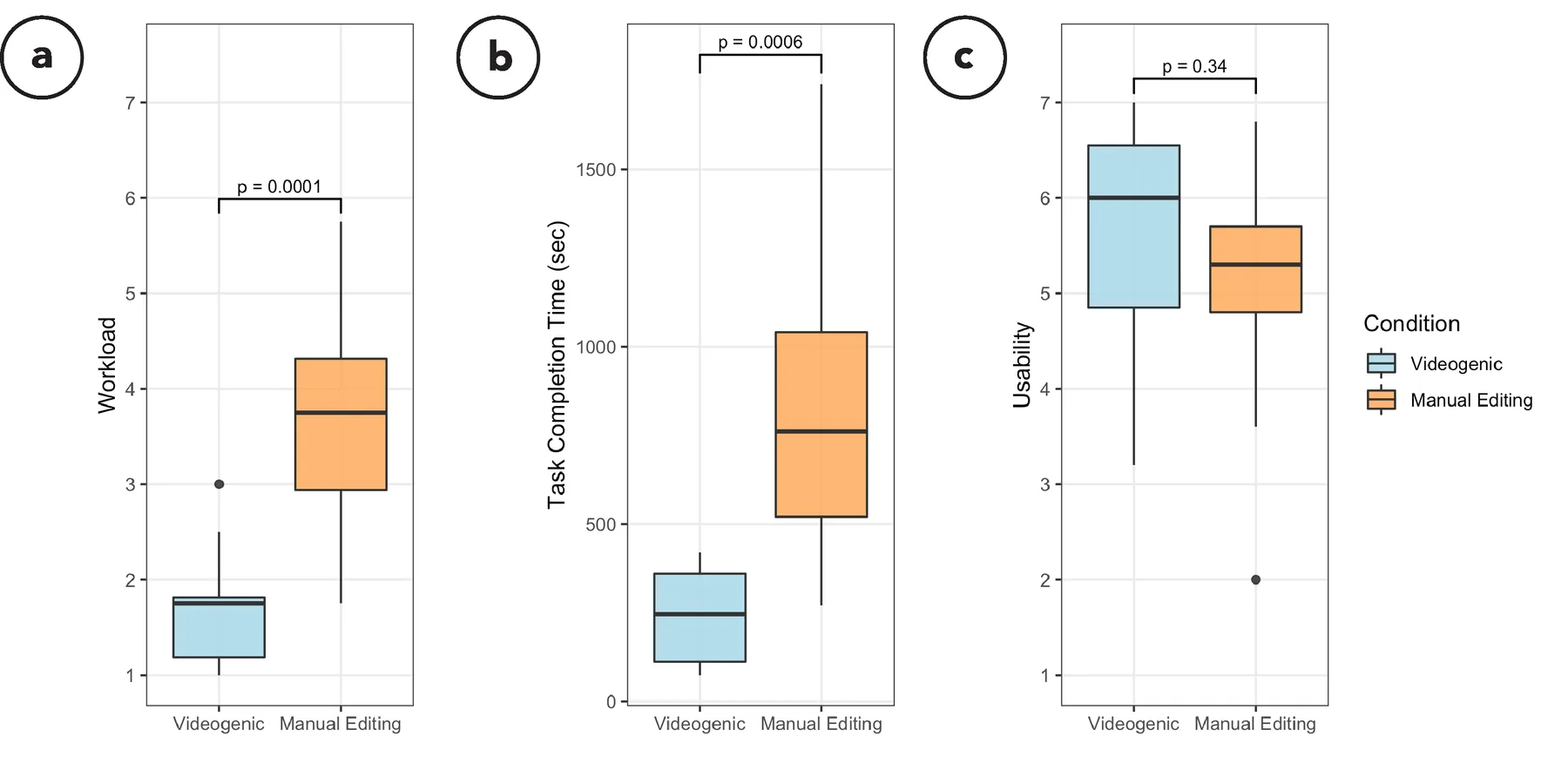
Editors said Videogenic saved them from scrubbing through footage to find the right clips ("With manual editing, I have to sort through a 5-minute video just for that 5 seconds of good footage. (P1)"), and liked using the highlight graph "to see spots where there could be highlights in graph form (P8)".
We also asked 20 raters on Prolific to rate the editors' 24 highlight videos (12 made with Videogenic and 12 made manually in Premiere Pro). Raters gave the Videogenic videos slightly higher highlightness (how well a video captures the highlight moments) and similar production quality, and neither difference was significant.
Applications
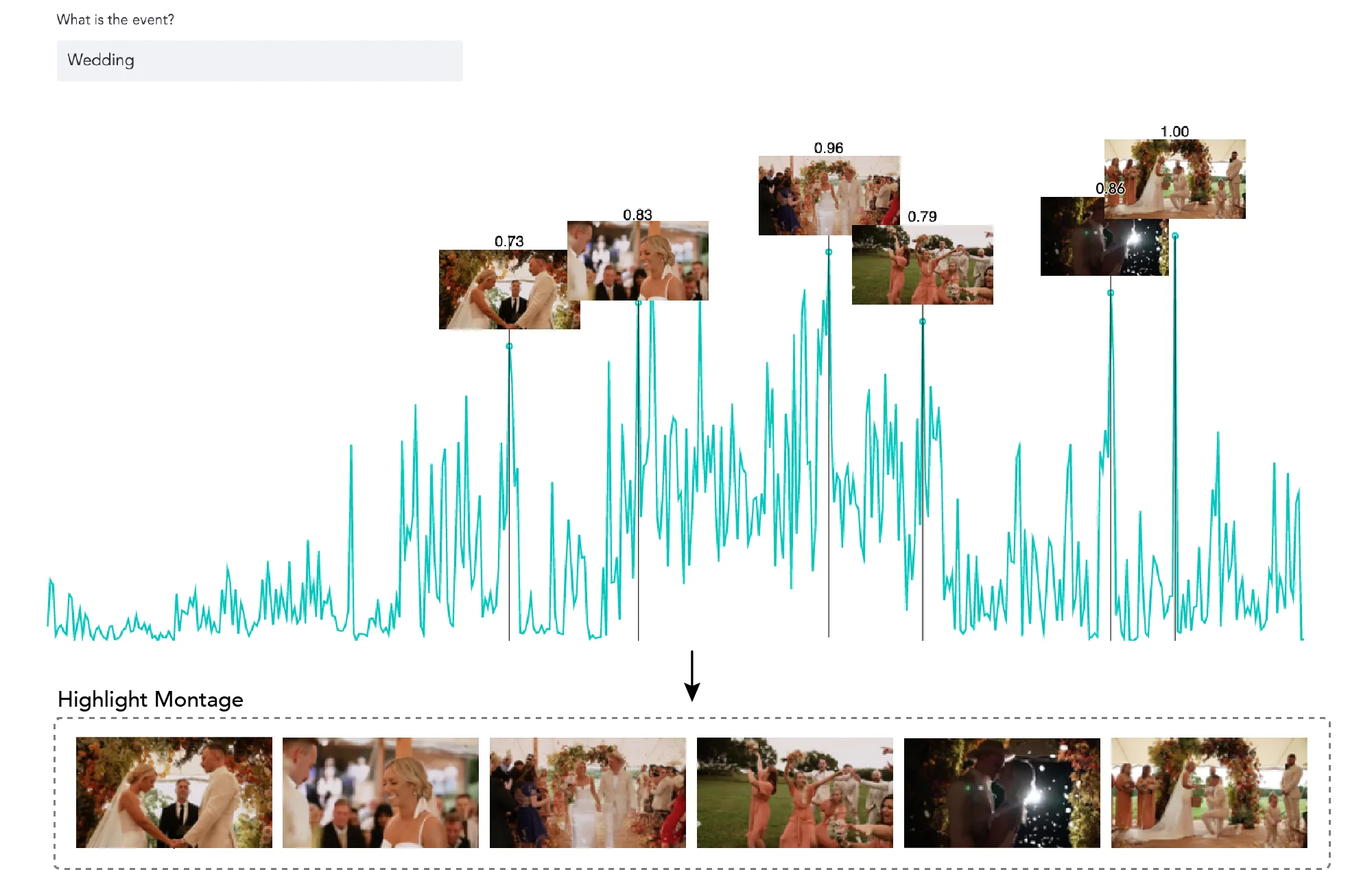
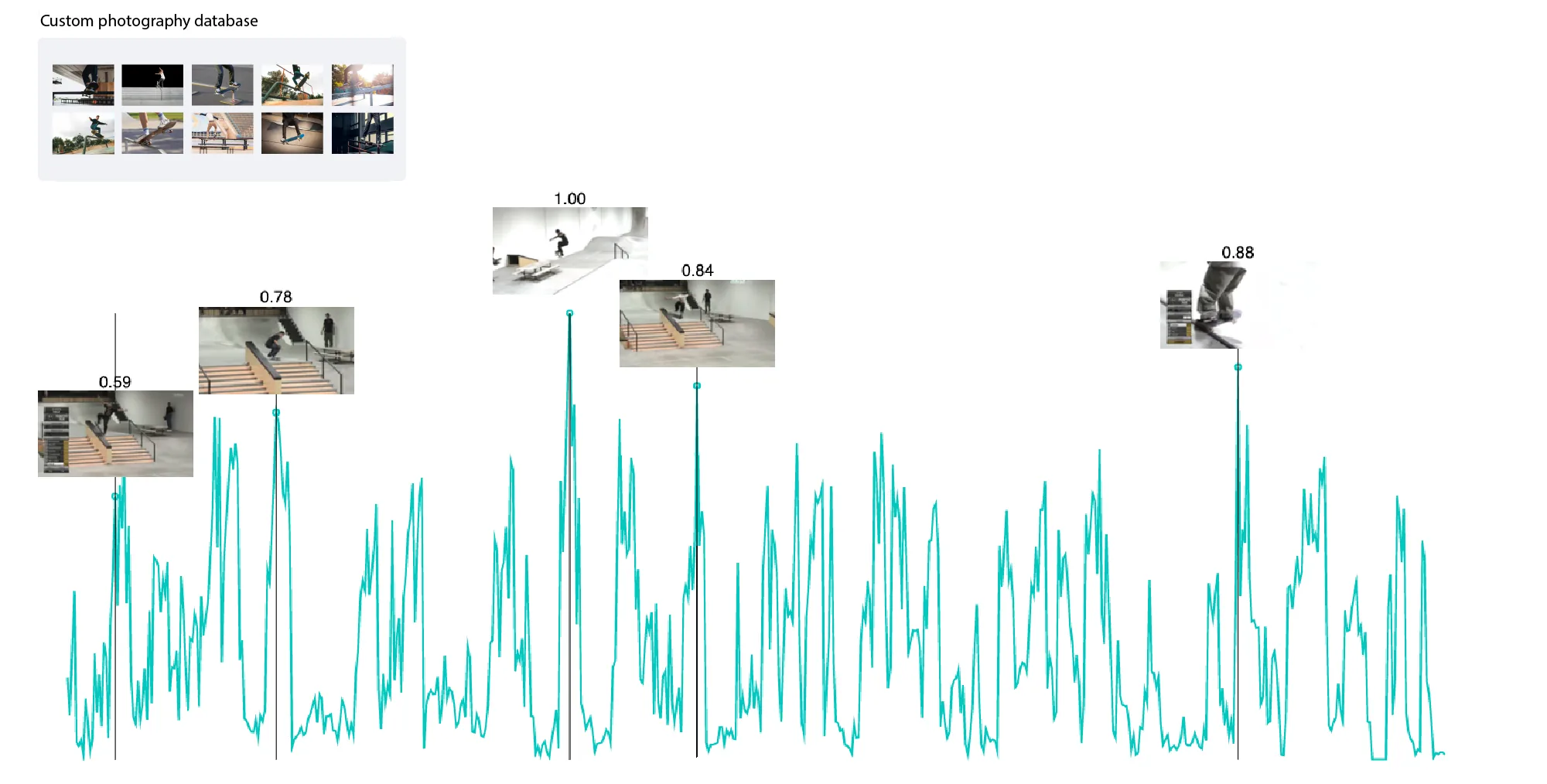
We implemented two applications that use Videogenic as a building block: a highlight moments montage, which combines several local maxima of the highlight scores, and a personalized highlight video, which uses the user's own photographs as the photography database (e.g., photographs of one particular skateboarding trick).
Example Results
Below are Videogenic's highlights for the 16 source videos in the human evaluation.
Officiant address
Cars drifting
Skateboard kickflip
Graduation hat toss
Breakdance power move
Bird carrying prey
Completing clean and jerk
Rose blooming
Parkour jump
Sun rising
Solar eclipse peak
Fireworks burst
Placing snowman head
Peacock displaying feathers
Jumping from aircraft
Riding the wave
Video Sources
- https://www.youtube.com/watch?v=kOSbdmOlKUk
- https://www.youtube.com/watch?v=_hTesCkABtM
- https://www.youtube.com/watch?v=ynlZXzQrCig
- https://www.youtube.com/watch?v=9cqd6OMuicg
- https://www.youtube.com/watch?v=PznYLQ1wf1Q
- https://www.youtube.com/watch?v=JOfk4_o6Au4
- https://www.youtube.com/watch?v=EiqEFUFM-KI
- https://www.youtube.com/watch?v=gpZxiJKHB9c
- https://www.youtube.com/watch?v=TWgyMCVenrE
- https://www.youtube.com/watch?v=Ets4wohr0Z4
- https://www.youtube.com/watch?v=HM5w7Aq8buw
- https://www.youtube.com/watch?v=jCpqNoumNIc
- https://www.youtube.com/watch?v=zxrxzvA2sQU
- https://www.youtube.com/watch?v=TTwT1-TpFhE
- https://www.youtube.com/watch?v=IA-ZEDJAbfE
- https://www.youtube.com/watch?v=tw-xgdupCOY
More Highlight Graphs
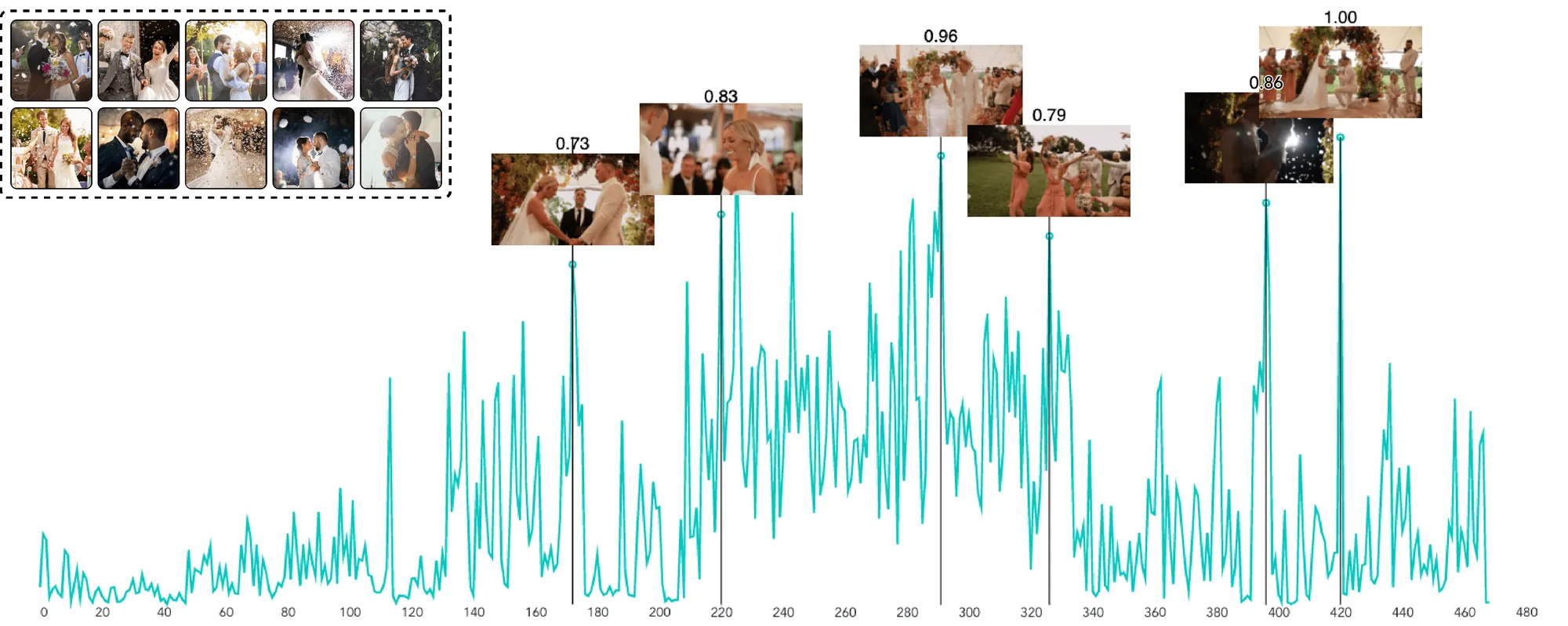
wedding.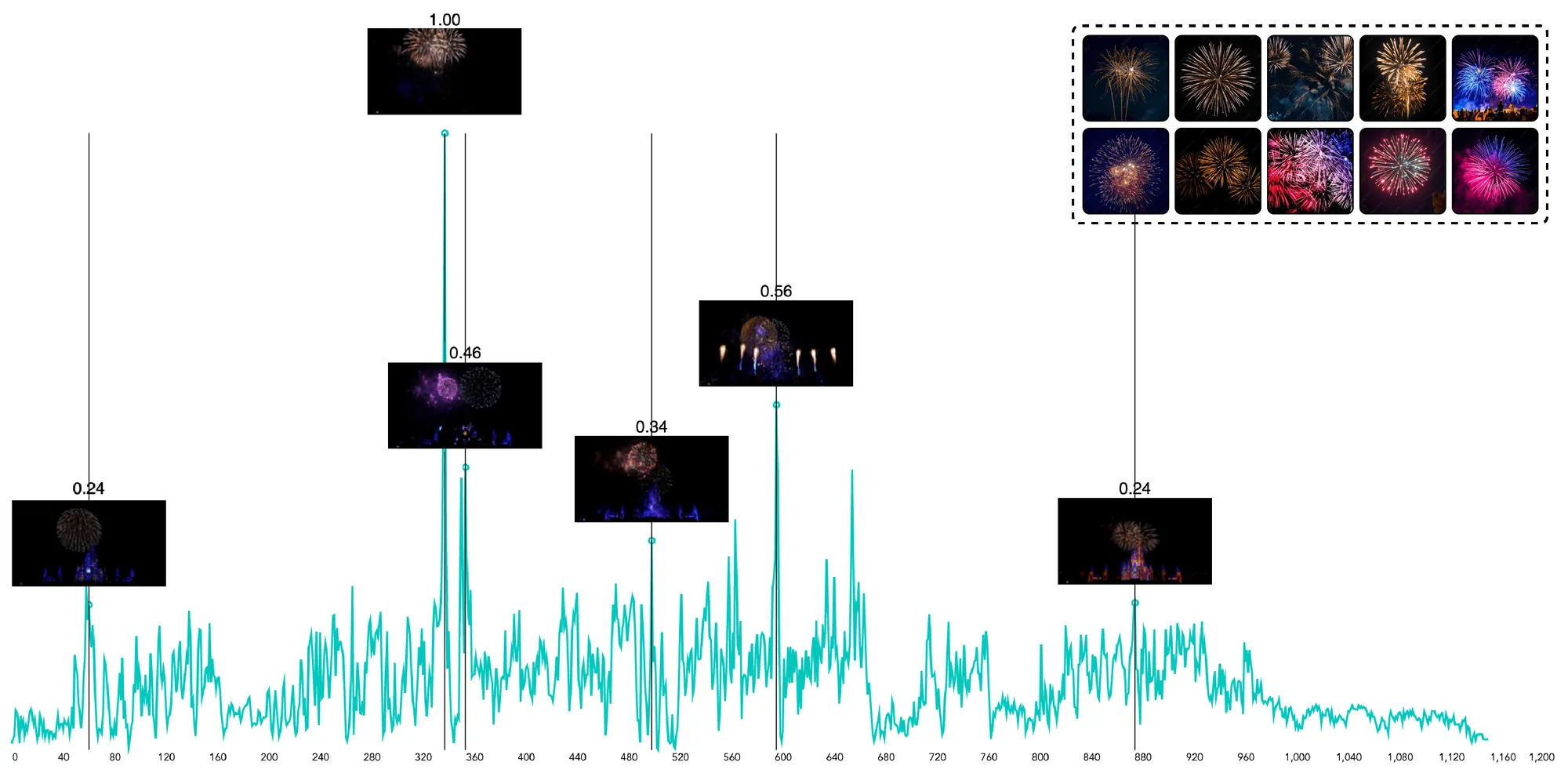
fireworks.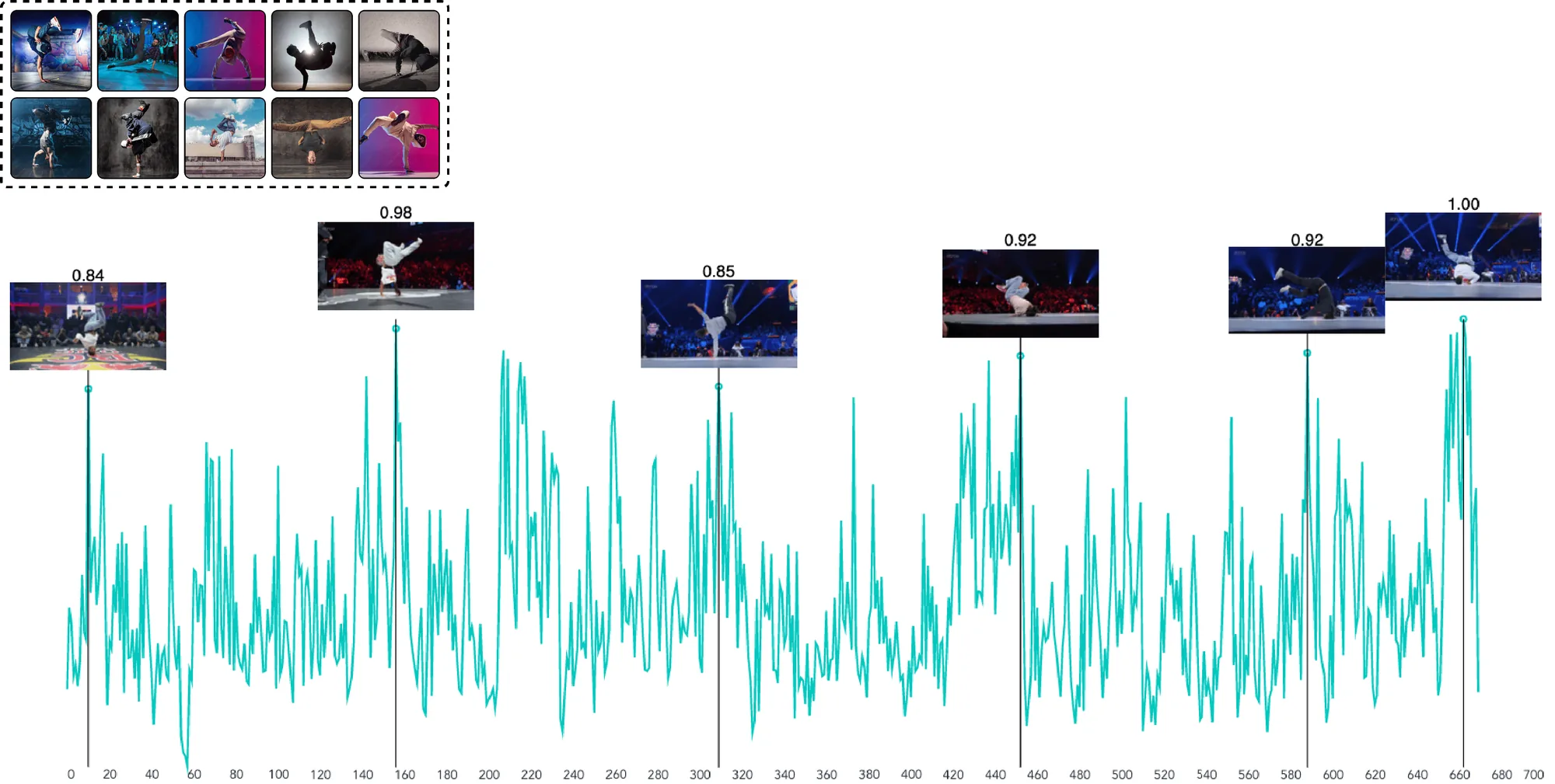
breakdance. Videogenic finds the power moves.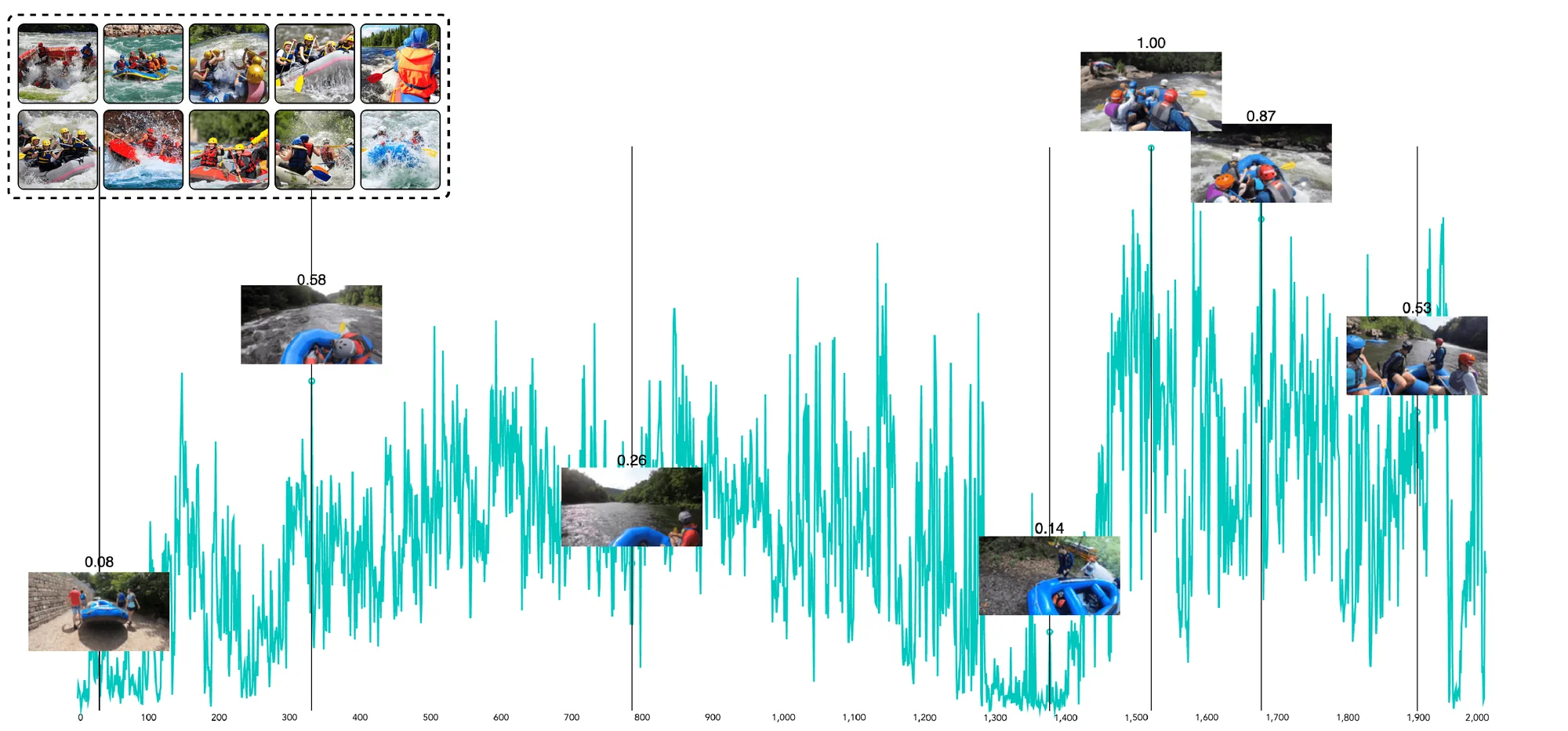
rafting. Videogenic gives the whitewater moments higher scores.Acknowledgments
We would like to thank colleagues in the Augmented Design Capability Studio for providing valuable feedback on our system.
Citation
@inproceedings{lin2024videogenic,
  author    = {Lin, David Chuan-En and Caba Heilbron, Fabian and Lee, Joon-Young and Wang, Oliver and Martelaro, Nikolas},
  title     = {Videogenic: Identifying Highlight Moments in Videos with Professional Photographs as a Prior},
  booktitle = {Proceedings of the 16th Conference on Creativity \& Cognition},
  series    = {C\&C '24},
  year      = {2024},
  pages     = {328--346},
  numpages  = {19},
  publisher = {Association for Computing Machinery},
  address   = {New York, NY, USA},
  doi       = {10.1145/3635636.3656186},
  url       = {https://doi.org/10.1145/3635636.3656186},
  location  = {Chicago, IL, USA}
}