




Soundify: Matching Sound Effects to Video
Soundify matches, syncs, and mixes sound effects for video, exploiting CLIP’s activation maps as a zero-shot object detector.
Summary
In the art of video editing, sound helps add character to an object and immerse the viewer within a space. Through formative interviews with professional editors (N=10), we found that the task of adding sounds to video can be challenging. This paper presents Soundify, a system that assists editors in matching sounds to video. Given a video, Soundify identifies matching sounds, synchronizes the sounds to the video, and dynamically adjusts panning and volume to create spatial audio. In a human evaluation study (N=889), we show that Soundify is capable of matching sounds to video out-of-the-box for a diverse range of audio categories. In a within-subjects expert study (N=12), we demonstrate the usefulness of Soundify in helping video editors match sounds to video with lighter workload, reduced task completion time, and improved usability.
Video
Background
Besides the sounds recorded on set, video editors often add sounds from sound libraries, such as effects (e.g., a bicycle bell ring) and ambients (e.g., street noise). This step is called the foley pass.
To understand how editors do this, we interviewed 10 professional video editors with 8 to 20 years of experience. They found adding sounds to be challenging and time-consuming, especially as the amount of footage grows. Finding one sound by keyword search may not take much effort, but a full-length video can have hundreds of clips with several sounds each. Syncing each sound to the video was a "laborious process (I10)", and adjusting panning and volume frame by frame was "the tedious part that no one wants to do (I5)".
Method
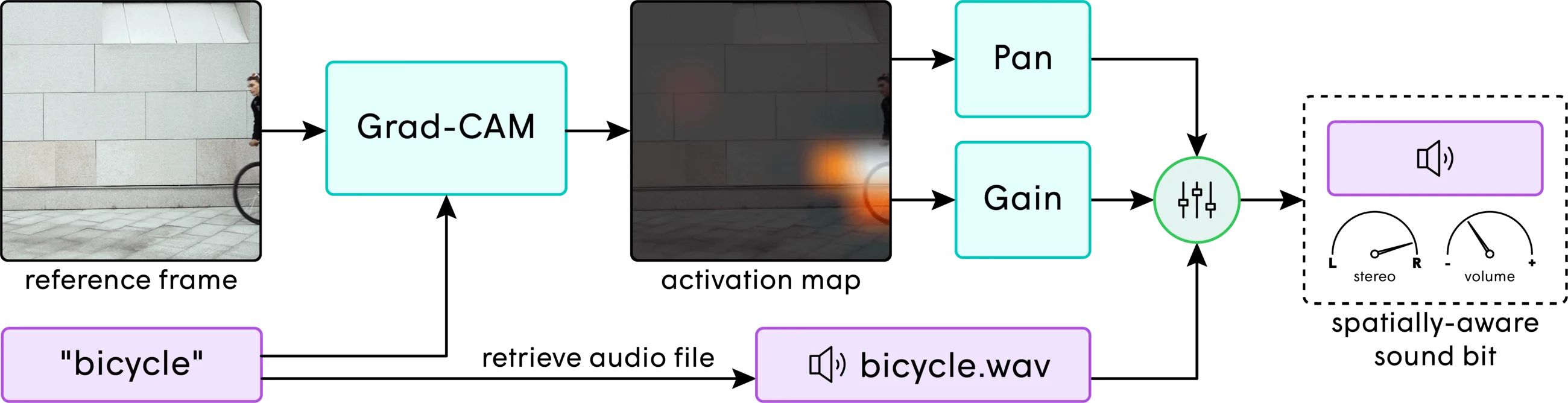
We present Soundify, a system that assists video editors in matching sound effects to video. Rather than generating audio, which needs large training datasets and often has noise and artifacts, Soundify retrieves sounds from a studio-quality sound effects library and adjusts their panning and volume to fit the video. Our key insight is to combine such a library with CLIP, a model trained on pairs of images and text, which we repurpose as a zero-shot sound detector. We compare the labels of the sound clips with the video to find which sounds are present, and use CLIP's activation maps to find where each sound comes from in the frame.
Design Principles
From the interviews, we distilled four design principles for Soundify:
- Surface. Find sounds that match the video content, so the editor does not have to search by keyword for every clip.
- Synchronize. Bring a sound in when its object appears on screen and take it out when the object leaves.
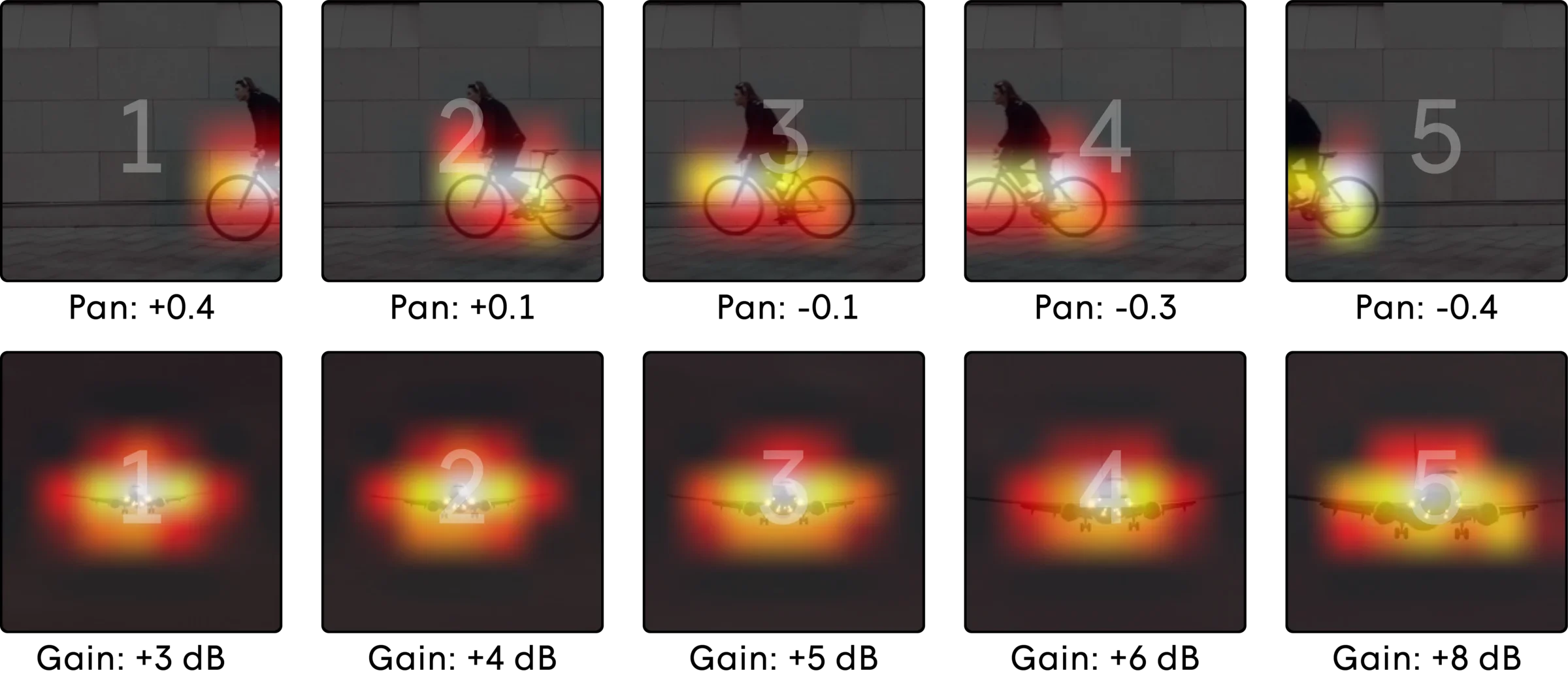
- Spatial. Adjust a sound as its object moves. For example, a bicycle riding from left to right should move from the left ear to the right ear, and it should get louder as it comes closer.
- Stack. Let the editor layer several sounds, usually a base layer of ambients and several layers of effects.
System Overview
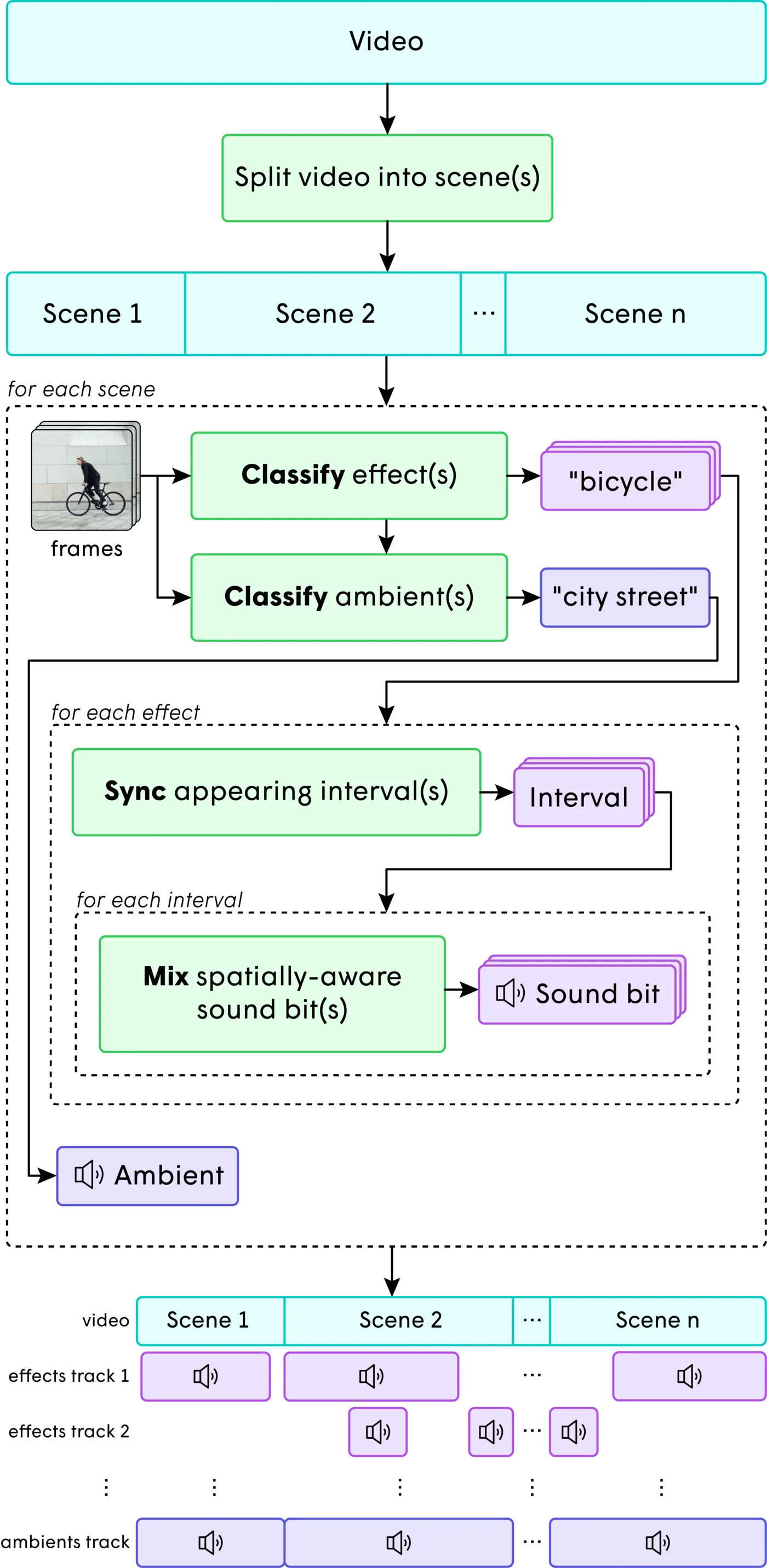
Soundify first splits a video into scenes, using the color histogram distance between neighboring frames to detect scene changes. For each scene, it runs three stages: Classify finds the effects and the ambient, Sync finds when each effect's object is on screen, and Mix sets each effect's panning and volume over time.
Classify
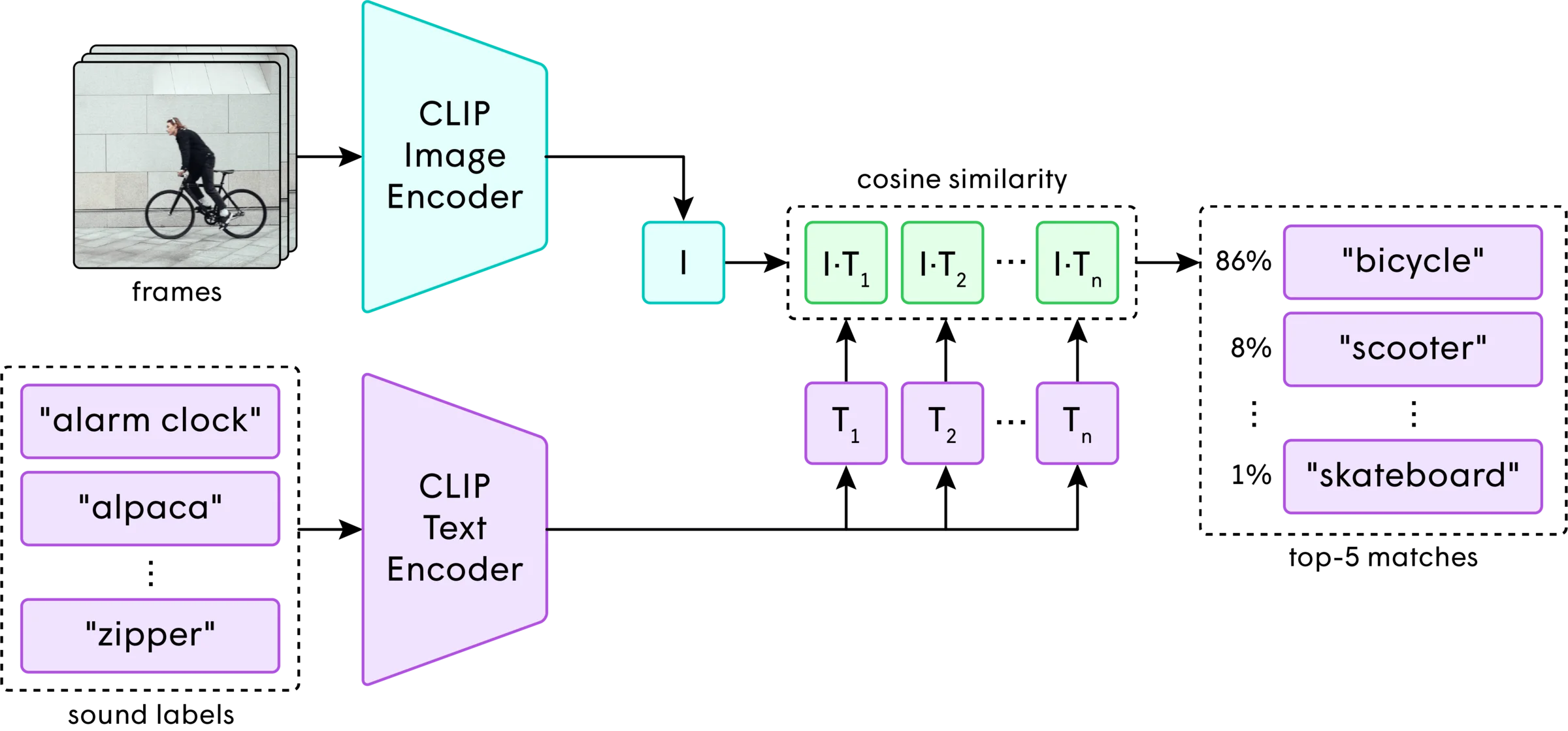
Soundify matches sounds to a video by classifying "sound emitters", the objects or environments that make sound. The labels come from Epidemic Sound, a library of over 90,000 high-quality sound effects. For each scene, we classify effects (e.g., bicycle, camera, keyboard) and ambients (e.g., street, room, cafe). We run the frames through the CLIP image encoder and each effects label through the CLIP text encoder, then compare them with cosine similarity to get the top-5 matching effects, from which the editor can pick one or more. Ambients can be harder to classify since the background may be out of focus, so we also rerank the predicted ambients by how similar they are to the effects the editor selected. For example, forest may be ranked higher than cafe if the editor selected waterfall.
Sync
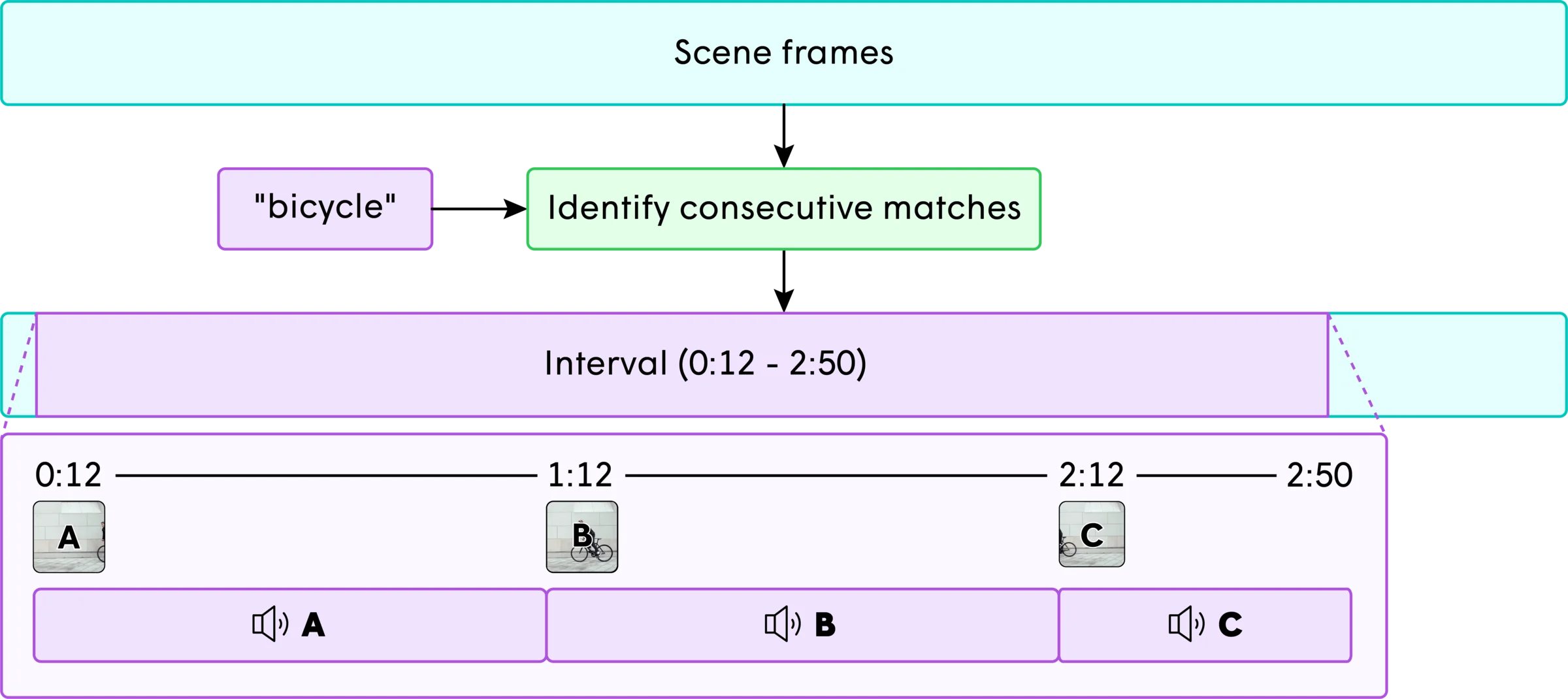
An object may only be on screen for part of a scene. To sync an effect to its object, we compare the effects label with each frame of the scene. A run of consecutive frames with similarity scores above a threshold becomes an interval, and a scene can have several intervals if the object leaves and comes back.
Mix
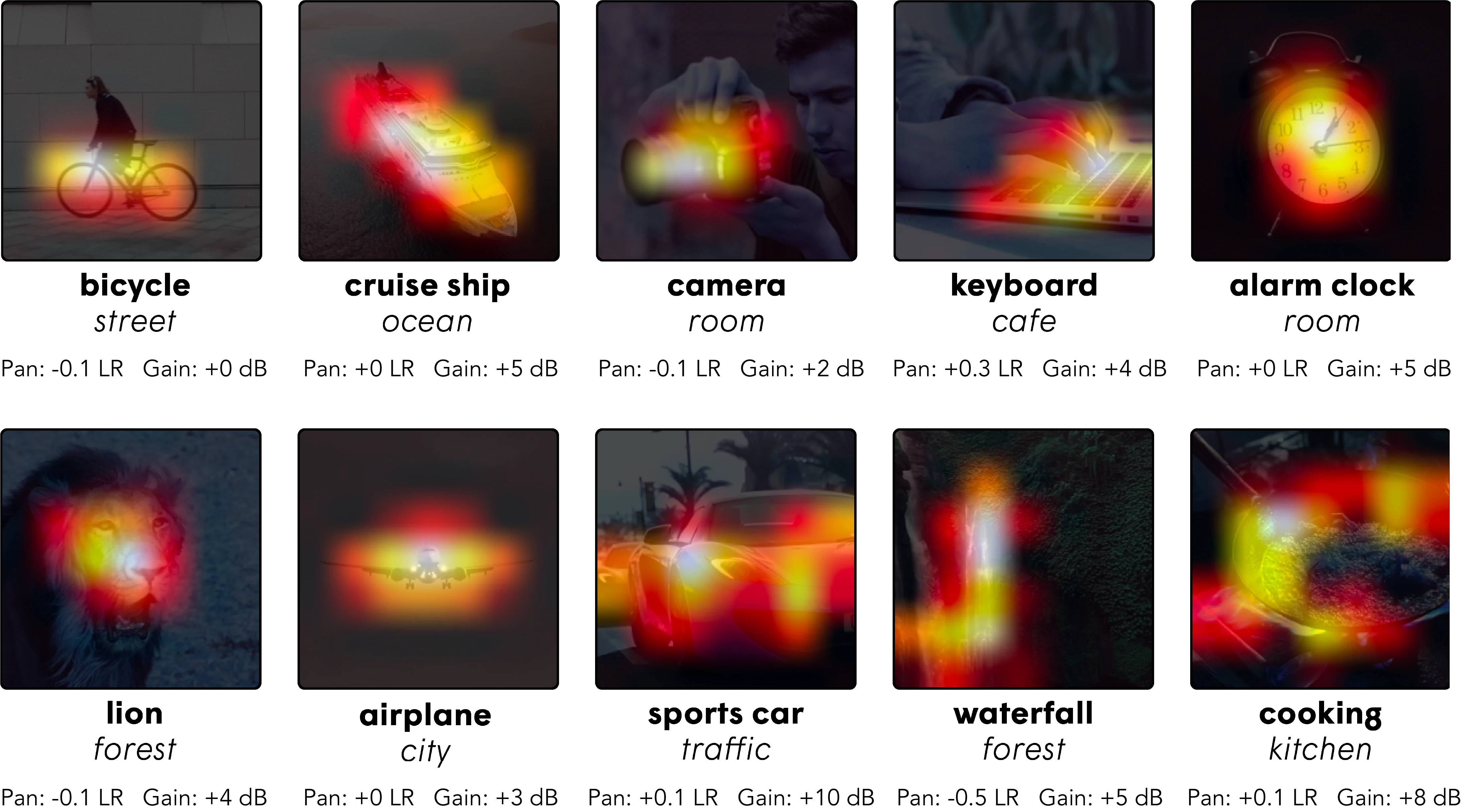
To make the sound spatial, we split each interval into chunks of about one second. We run the first frame of each chunk through Grad-CAM to get an activation map from CLIP's last visual layer (ResNet-50), which shows where the sound emitter is. This works for arbitrary objects, not only a fixed set of classes. We set the pan from the horizontal position of the map's center of mass and the gain from its normalized area, apply them to the effect's audio file, and stitch the chunks together with crossfades. The ambient plays across the whole scene at -5 dB so it does not overpower the effects.
Interface
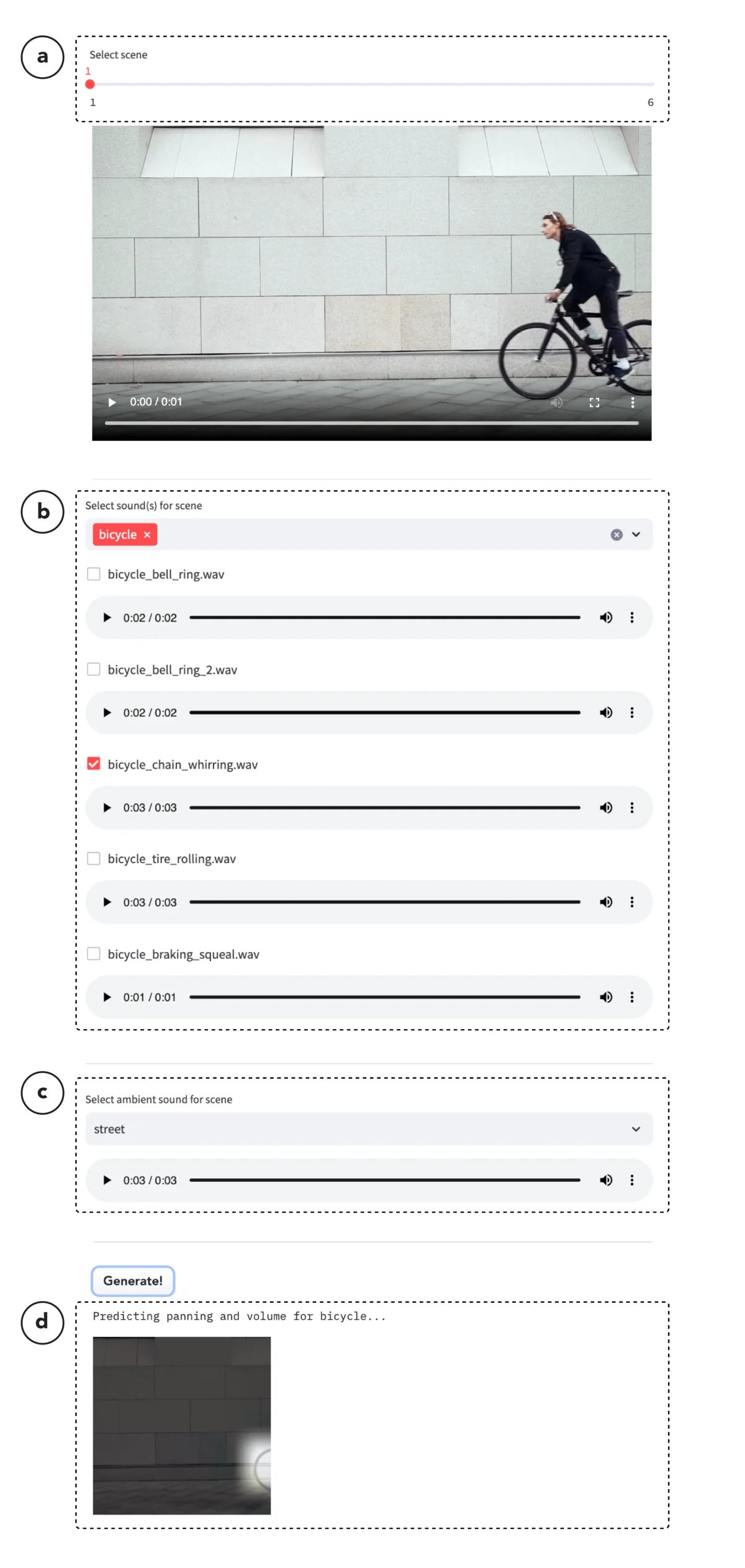
In the interface, the editor moves between scenes with a slider. For each scene, the top-scoring effect and ambient are filled in by default, and the editor can preview sounds, add or stack more effects, or switch the ambient from dropdown menus sorted by score. After the editor clicks "Generate", the interface shows the predicted heatmaps in one-second intervals. The editor can then export the video and audio tracks, numbered by scene, to use in a video editor of their choice.
Human Evaluation
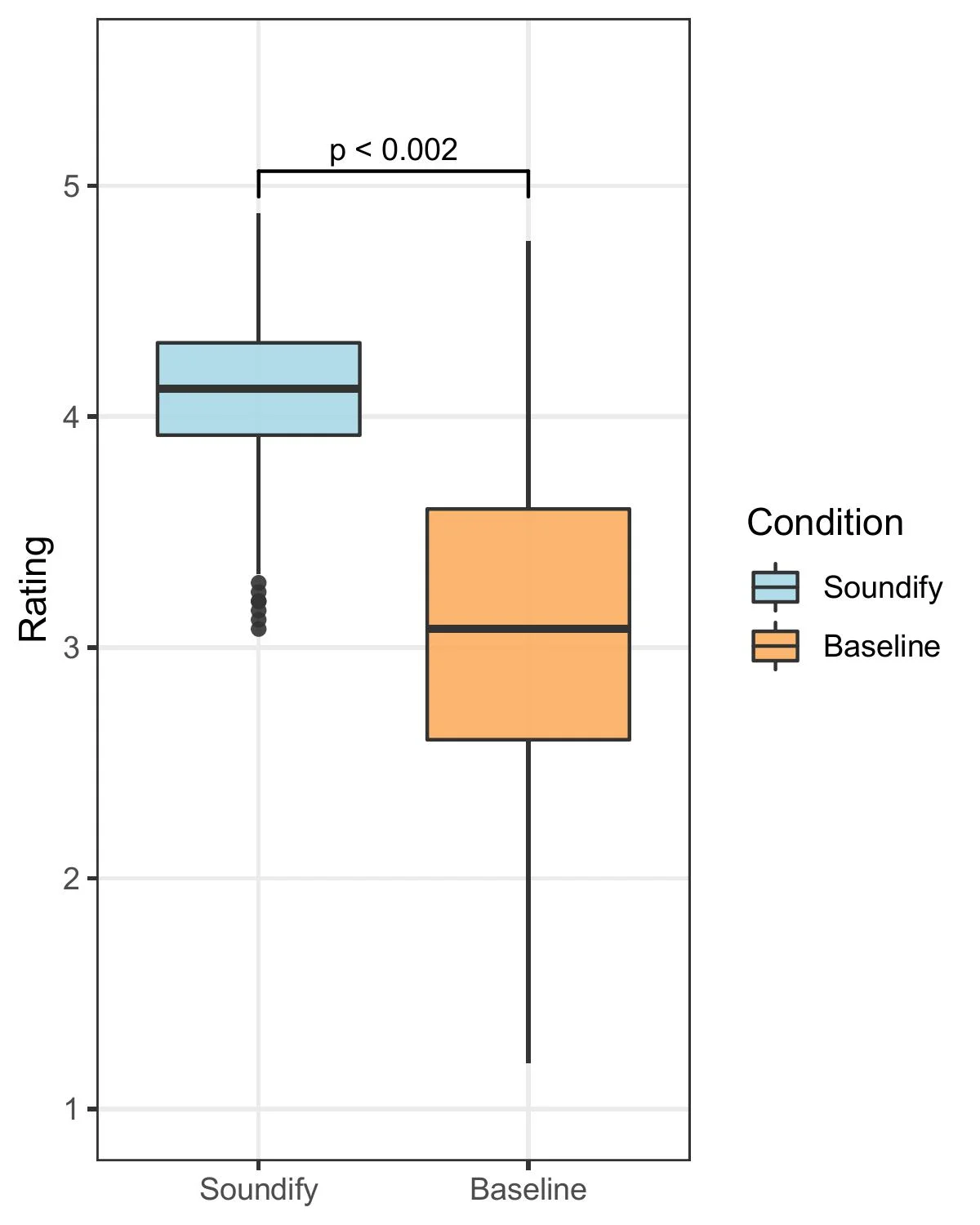
To test how well Soundify matches sounds to video, we compared it with a baseline built on YOLO, an object detector trained on the COCO dataset, which sets the panning from the horizontal position of an object's bounding box and the volume from its area. We built a collection of 2,160 audio clips in 54 categories from the ESC-50 and UrbanSound8K datasets, and 1,105 video clips from Getty Images found by searching for each category label. Both systems matched sounds to the videos automatically.
We ran a Mechanical Turk study with 889 raters, who needed headphones with left and right channels. Each video was rated by five raters who did not know which system made it, on a 5-point scale for how well the audio matched the video in object type, timing, volume, panning, and overall. Raters gave Soundify's results significantly higher ratings than the baseline's. This suggests that CLIP's activation maps can detect objects beyond a fixed set of training categories, and may approximate an object's size and position better than bounding boxes.
Expert Study
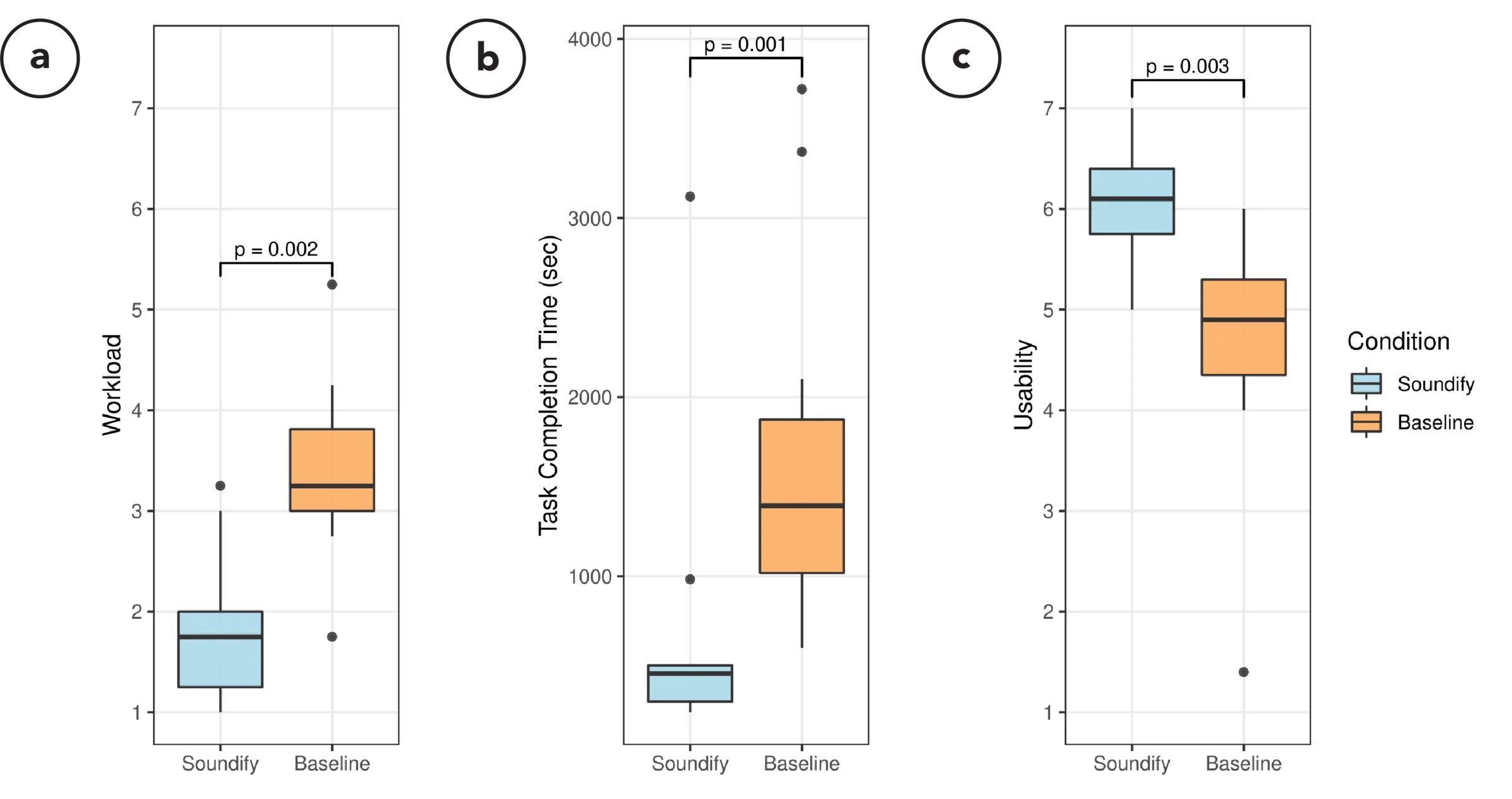
We then ran a within-subjects study with 12 professional video editors recruited from Upwork. Each participant matched sounds to one video with Soundify and to another with a baseline of manual editing, where they searched the Epidemic Sound library by keyword and added the sounds in Adobe Premiere Pro. We counterbalanced the order of the conditions and of the two videos, which were of comparable difficulty. After each condition, participants rated their workload (NASA TLX) and usability (System Usability Scale) on 7-point Likert scales and reported how long the task took.
Participants reported significantly lower workload, shorter task completion time, and higher usability with Soundify than with the baseline. Participants also liked that Soundify found sounds from the visuals instead of keyword searching, put them in the right place in the timeline, and predicted the panning well. One participant described most sound effect placement in video editing as "essentially grunt work (P5)", and another said, "I went from 35 minutes to 7 minutes (P8)".
Example Results
Below are example results from Soundify, with the matched effects (in bold) and ambient labeled above the activation map. Play them with headphones to hear the panning. Soundify can detect several sound emitters at the same time, such as footsteps and a tram. For objects that stand out less, like ripples on water, it can still match their sound while they are on screen, and the ambient captures sounds from things that are not on screen.

Cars
Cooking + Fire Crackle
Ducks + Water Ripple
Footsteps + Tram
Helicopter
Lightning
Seagulls + Crows
Washing Machine
Waterfall
Waves
Acknowledgments
We would like to thank all our user study participants, peers in our research group for providing valuable feedback on iterations of our system and paper write-up, and the anonymous reviewers for their comments.
Citation
@inproceedings{lin2023soundify,
  author    = {Lin, David Chuan-En and Germanidis, Anastasis and Valenzuela, Crist{\'o}bal and Shi, Yining and Martelaro, Nikolas},
  title     = {Soundify: Matching Sound Effects to Video},
  booktitle = {Proceedings of the 36th Annual ACM Symposium on User Interface Software and Technology},
  series    = {UIST '23},
  year      = {2023},
  articleno = {18},
  numpages  = {13},
  publisher = {Association for Computing Machinery},
  address   = {New York, NY, USA},
  doi       = {10.1145/3586183.3606823},
  url       = {https://doi.org/10.1145/3586183.3606823},
  location  = {San Francisco, CA, USA}
}