


Jigsaw: Supporting Designers to Prototype Multimodal Applications by Chaining AI Foundation Models
Jigsaw lets designers build multimodal AI workflows by chaining foundation models like puzzle pieces.
Summary
Recent advancements in AI foundation models have made it possible for them to be utilized off-the-shelf for creative tasks, including ideating design concepts or generating visual prototypes. However, integrating these models into the creative process can be challenging as they often exist as standalone applications tailored to specific tasks. To address this challenge, we introduce Jigsaw, a prototype system that employs puzzle pieces as metaphors to represent foundation models. Jigsaw allows designers to combine different foundation model capabilities across various modalities by assembling compatible puzzle pieces. To inform the design of Jigsaw, we interviewed ten designers and distilled design goals. In a user study, we showed that Jigsaw enhanced designers' understanding of available foundation model capabilities, provided guidance on combining capabilities across different modalities and tasks, and served as a canvas to support design exploration, prototyping, and documentation.
Video
Background
AI foundation models can now do many tasks off the shelf, across text, image, video, 3D, and audio, and many designers have started to use them in their creative work. However, these models often exist as standalone applications for one task. For example, a designer may brainstorm with ChatGPT or make visual prototypes with Midjourney, then copy and paste the results into another design tool. Designers also tend to stick to a few well-known models.
We interviewed ten designers from fields such as interior, product, graphic, and video game design about how they use AI. They felt they had limited knowledge of which models exist and what each can do. They found it tedious to be "AI-friendly," spending a lot of time turning design ideas into prompts and tweaking parameters. They found it hard to combine models that live on different platforms and work with different modalities. Finally, prototyping with these models was slow, and when models were chained, they could often only see the final result.
Method
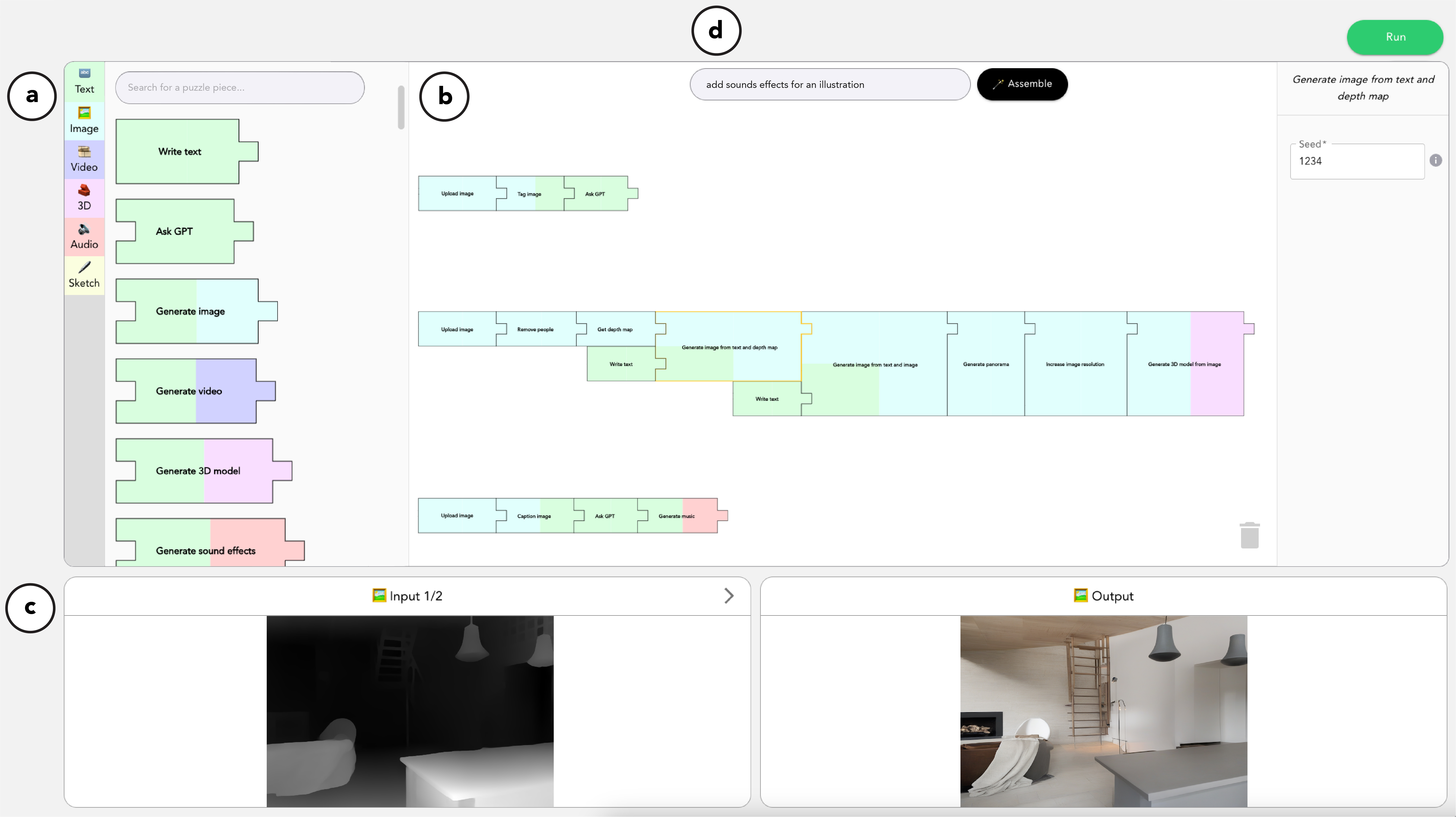
We present Jigsaw, a prototype system that represents AI foundation models as puzzle pieces. Designers combine the capabilities of different models, across tasks and modalities, by assembling compatible pieces. Unlike node-based tools for chaining AI models (e.g., Rapsai and ComfyUI), which are aimed more at users with some background in AI programming, Jigsaw uses a block-based editor to support non-technical designers. Jigsaw consists of four main components: the Catalog Panel, the Assembly Panel, the Input and Output Panels, and the Assembly Assistant.
Design Goals
Based on the interviews, we designed Jigsaw with four design goals:
- Catalog of AI foundation models. Explain what each model does with example results, and help designers find a model for their task.
- User-friendly instead of AI-friendly. Help designers turn ideas into prompts, and explain model parameters in plain terms.
- Intuitive interface for combining models. Show clearly which models can be combined across modalities, and suggest combinations.
- Facilitate effective prototyping. Make it easy to try model combinations and see the results, including intermediate results inside a chain.
Models as Puzzle Pieces
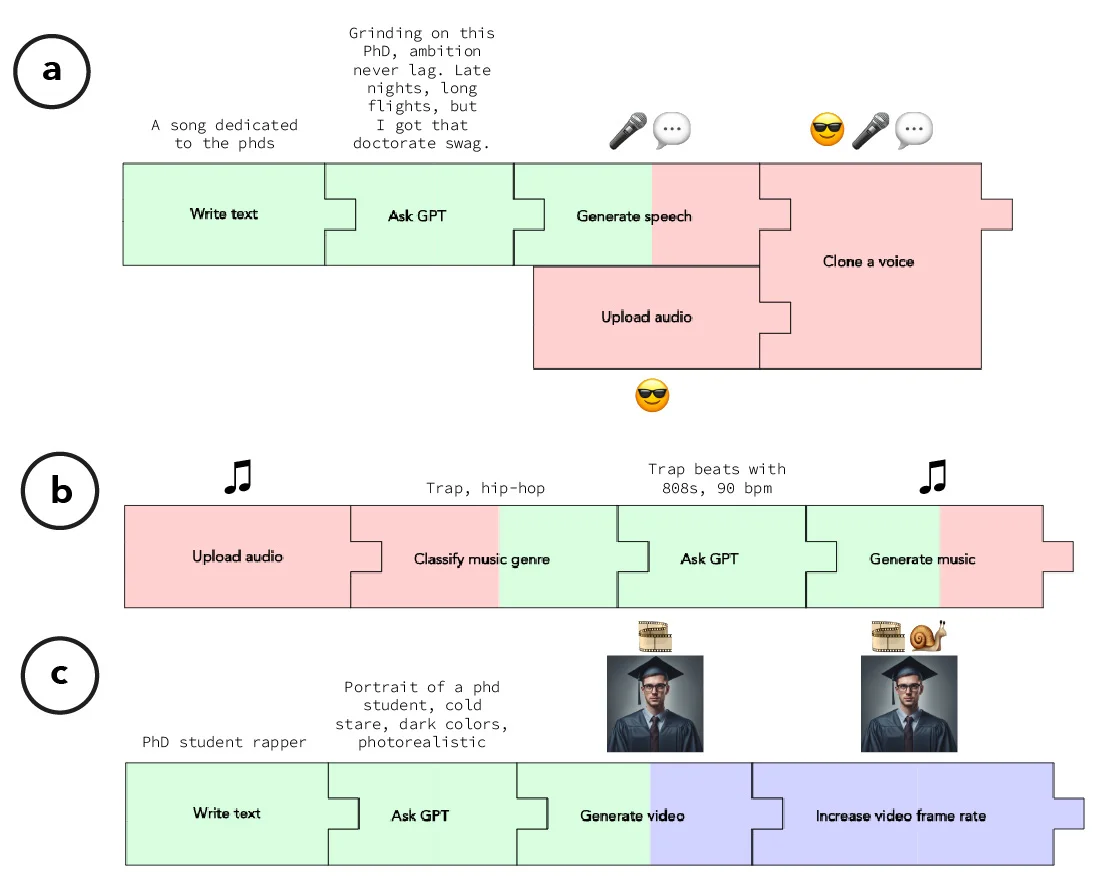
Since many foundation models work as input-output systems, we represent each one as a puzzle piece with an input arm and an output arm. A model piece is a model with parameters the designer can change, and an input piece takes in text, a media file, or a sketch from the designer. Jigsaw color-codes each piece by its input and output modalities, so the colors show which pieces fit together. For example, a text-to-image piece is green on the left (text) and blue on the right (image). The catalog covers six modalities common in creative work (text, image, video, 3D, audio, and sketch) with 39 models in total, including models with two inputs, such as ControlNet. When several models could do a task, we favored fast, zero-shot models with high-quality results.
Catalog Panel
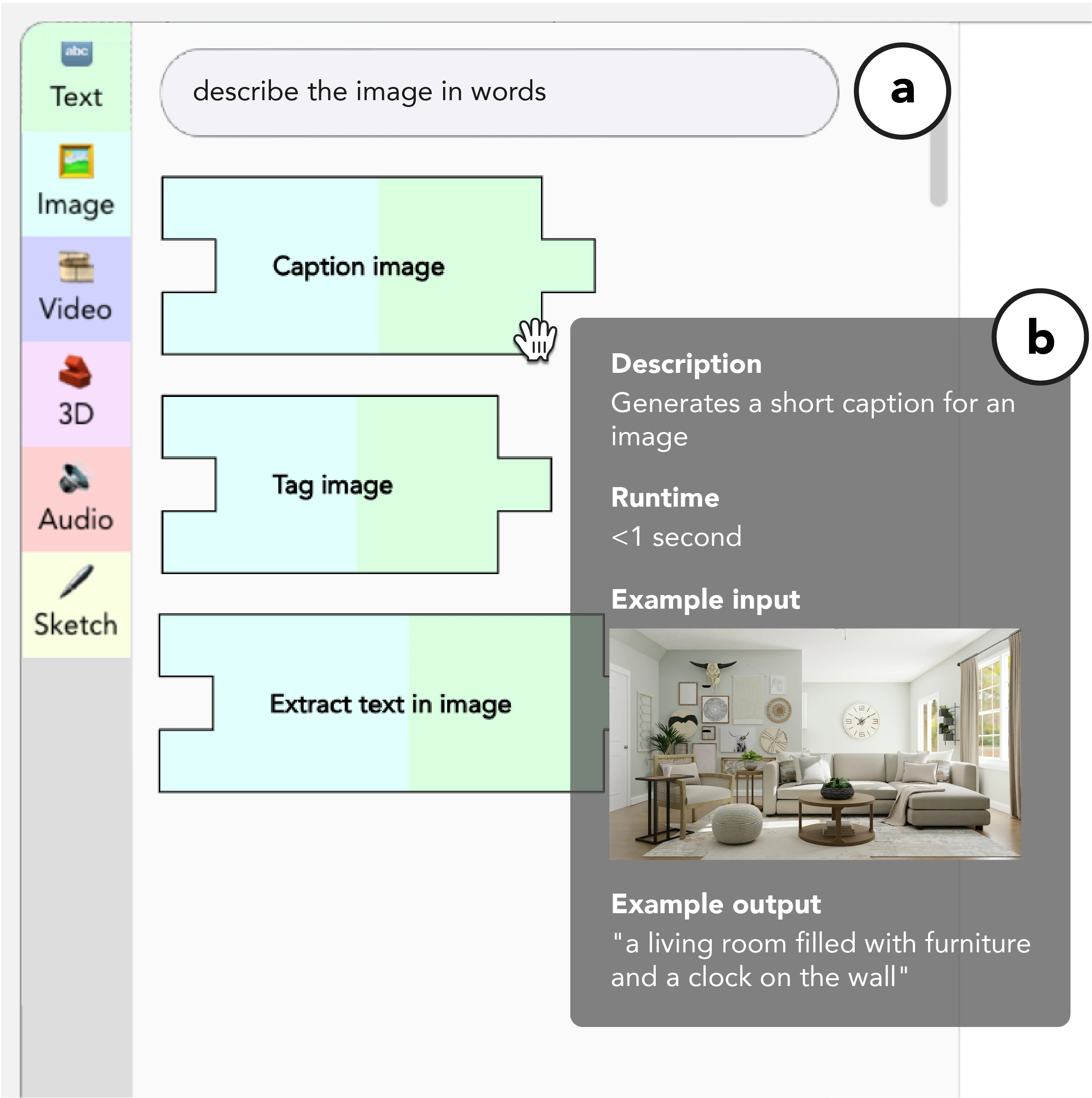
The Catalog Panel groups pieces by input modality. Designers can also describe their task in a semantic search bar, which returns the most similar pieces using CLIP text embeddings. Hovering over a piece shows what it does, its typical runtime, and an example input and output.
Glue Pieces
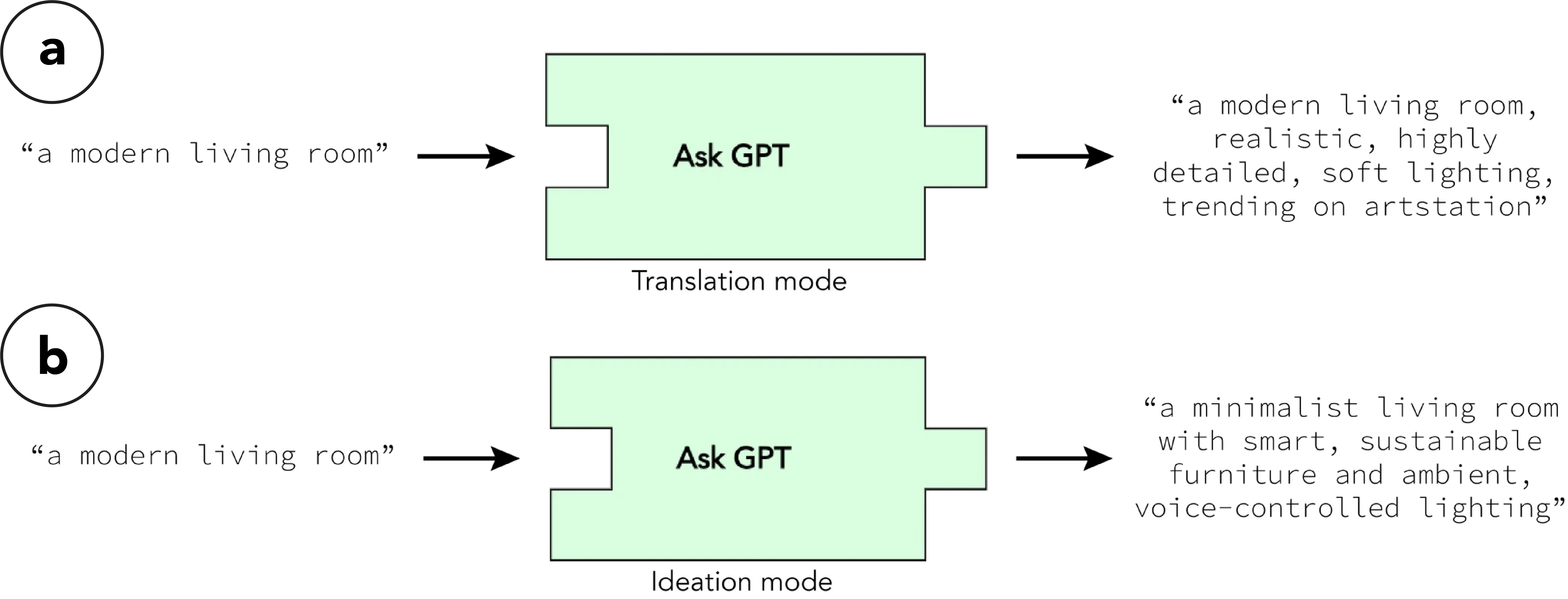
Sometimes two models do not line up directly, for example, when a step needs some reasoning in between. Inspired by Socratic Models, Jigsaw uses an LLM (GPT) as glue. The designer chains a piece that describes a modality in text (x-to-text), the LLM glue piece (text-to-text), and a piece that turns text into another modality (text-to-x). The custom glue piece follows any instruction from the designer, the translation glue piece rewrites text into a prompt for text-to-x models such as Stable Diffusion, and the ideation glue piece generates an idea for a design task.
Assembly Panel
The Assembly Panel is an infinite canvas where designers drag pieces from the Catalog Panel and assemble them into chains. We refer to the final arrangement of pieces as a model mosaic. Pieces only connect when they are compatible. When a designer drags a piece close to a compatible piece, Jigsaw shows a semi-transparent preview of the connection, and the piece snaps into place when released. An incompatible piece is pushed away.

Clicking on a model piece opens a parameters sidebar. Each parameter starts at a default value that generally gives good results and has limits, so designers can try different values without breaking the model. Tooltips explain in plain English how each parameter affects the results. Designers can build multiple chains on the canvas and run each one separately.
Input and Output Panels
The Input and Output Panels let designers type text, upload files, or draw sketches as inputs, and view, copy, or download the outputs. Selecting a piece in a chain shows the inputs and outputs at that piece, so designers can see how the data changes at each step.
Assembly Assistant
The Assembly Assistant recommends a chain of pieces for a task the designer describes in natural language. We give GPT a short description of each of the 39 models, an example answer in JSON, and the task, and ask it to complete the task using only those models. We then ask GPT to check its answer against four criteria, such as whether it used only the given models and whether each step connects to the next, and to correct it if needed. Jigsaw adds the chain to the Assembly Panel, where the designer can edit it further.

System Walkthrough
Zaha, an interior designer, is redesigning a client's home from a photo of the room. She tags the objects in the photo and passes them to Ask GPT in ideation mode, which suggests "an airy space with a minimalist fireplace and ladder, illuminated by low-hanging lamps." She generates the redesign from this concept and a depth map of the room, which preserves its structure better than an edge map. She then replaces the ladder with a glass spiral staircase, generates a 3D model, and asks the Assembly Assistant to help add music based on the image.
.webp)
User Study
We invited the ten designers from the interviews back for a one-hour remote user study, where they thought aloud while using Jigsaw for the first time. After a 10-minute introduction, participants had 15 minutes to reproduce the interior design model mosaic above from a design brief, then 20 minutes to freely create their own model mosaics, and we encouraged them to try pieces in multiple modalities. We ended with a 15-minute semi-structured interview.
All participants completed both tasks. Many said they discovered AI capabilities they had not known about. In their free creations, participants used 8 model pieces on average, and all of them went beyond well-known models such as GPT and Stable Diffusion. Participants said the tooltips helped them understand what each piece can do, and the translation glue piece helped them get satisfying results without repeatedly rephrasing prompts.
Participants found Jigsaw easy to pick up. The matching colors and snapping feedback told them which pieces could connect, so they did not run into compatibility errors after building a workflow. Seeing intermediate outputs almost instantly helped them quickly test ideas and adjust individual steps.
Participants also used the Assembly Panel as a canvas for brainstorming and documentation. They tested partial workflows before combining them and made separate chains for different stages of their design process. They said the canvas made it easy to track how an idea evolved and could help them explain ideas to clients. They found the Assembly Assistant useful for getting a first set of pieces to start from, though they noted it was less robust for ambiguous tasks or tasks that need very complicated mosaics.
Example Results
Below are more model mosaics made with Jigsaw. The first two were created by participants during the free creation task.
Audio-Visual Storytelling
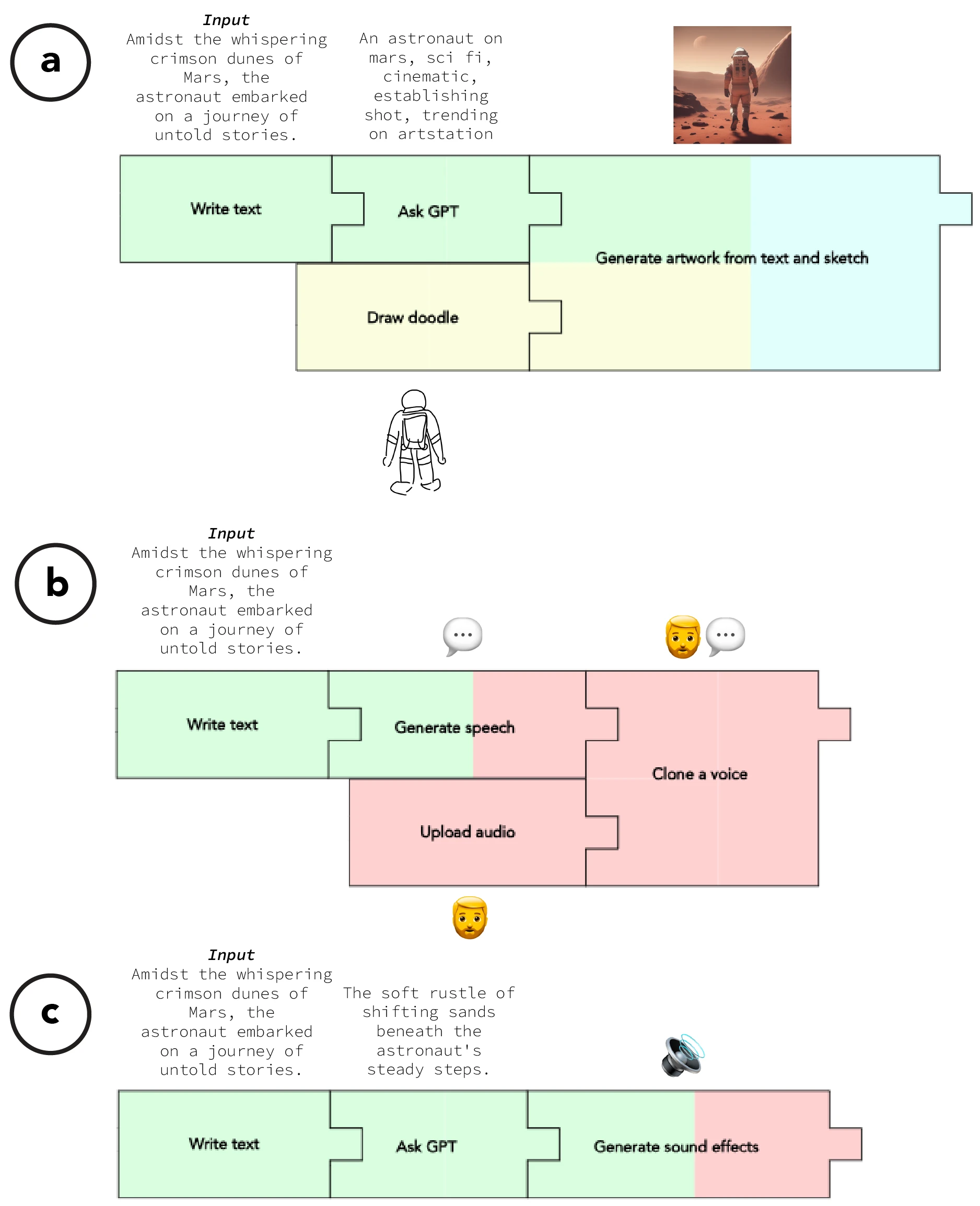
P2, an illustrator, discovered a piece that adds a guiding sketch to text-to-image generation, and used it to create an audio-visual story.
Video Game Character
P10, a game designer, wanted his character to look like Superman flying but was not sure how, so he asked the Assembly Assistant. It recommended a reference pose image, a pose extraction model, and a ControlNet model guided by pose, and P10 used a wooden mannequin to set the pose.
.webp)
Music Creation Pipeline
Acknowledgments
We would like to thank friends in the Augmented Design Capability Studio for providing valuable feedback on iterations of our system and paper write-up, and the anonymous reviewers for their comments.
Citation
@inproceedings{lin2024jigsaw,
  author    = {Lin, David Chuan-En and Martelaro, Nikolas},
  title     = {Jigsaw: Supporting Designers to Prototype Multimodal Applications by Chaining AI Foundation Models},
  booktitle = {Proceedings of the 2024 CHI Conference on Human Factors in Computing Systems},
  series    = {CHI '24},
  year      = {2024},
  articleno = {4},
  numpages  = {15},
  publisher = {Association for Computing Machinery},
  address   = {New York, NY, USA},
  doi       = {10.1145/3613904.3641920},
  url       = {https://doi.org/10.1145/3613904.3641920},
  location  = {Honolulu, HI, USA}
}